Channel Classifier
Channel Classifier Overview
A Channel Classifier serves as an organizational container that helps structure and manage data within the Energyworx platform. It acts as a logical grouping mechanism for channels: each channel must belong to exactly one classifier, while a single classifier can contain multiple channels, typically one channel per data source.
A channel classifier has two names of its own, and the channel it creates on a datasource can carry a third:
- A technical name is used for internal reference by the platform and data processing components (e.g., flow rules).
- A display name is the user-friendly, readable name that appears in the console.
- A channel name is an optional label on the channel of a single datasource, so the same classifier can be named differently on different datasources.
See Channel naming for how the three relate, and for which name the console, the API and integrations each use.
Data Components
Channel Classifiers manage three distinct types of data.
- Timeseries Data: These are the primary numerical values stored with their corresponding timestamps. They are based on a configured unit type, such as
kWhfor power consumption. - Annotations: This is flexible, unstructured metadata that can be attached to individual data points as objects. It is best suited for dynamic information that can vary between readings, such as
gapsorunverified readings. - Datapoint Attributes (DPAs): These are structured metadata fields with predefined types (e.g., float, timestamp, or enum/symbols) that are configured at the classifier level. They are ideal for consistent, repeating metadata that appears across many readings, as they are stored more efficiently than annotations.
Key Features
- Each Channel Classifier is permanently associated with a Channel Family.
- A Channel Family determines the data retention policy for all channels within that classifier.
- A Channel Family also provides a standardized way to organize related channels and their metadata.
- The structured attribute definitions within a Channel Family enable efficient data storage and retrieval.
For more detailed information, please refer to the Channel Families guide.
Channel naming
A channel can carry up to three different names. Two of them belong to the channel classifier, and are therefore the same everywhere that classifier is used. The third belongs to one channel on one datasource.
| Name | Scope | Where it is set | Can it change? |
|---|---|---|---|
| Technical name | The namespace — one per classifier | When the classifier is created | No, it is immutable |
| Display name | The namespace — one per classifier | Classifier details in the console, or the API | Yes, at any time |
| Channel name | One channel on one datasource | Market adapter, transformation configuration, or a rule | Yes, at any time |
Technical name
The technical name identifies the classifier. It must be unique within the namespace, and it cannot be changed once set, because data, flows and integrations all reference it. Everything that processes or exchanges data uses this name:
- Timeseries are stored and queried by it. The timeseries API always identifies a channel by its technical name — a display name or channel name cannot be used there.
- Rules see it as the column name in
self.dataframe, and flow configurations reference it. - Market adapter output and northbound/southbound message formats reference it.
Display name
The display name is a free-text label on the classifier, meant to make it readable for business users. No uniqueness constraint, maximum length or character restriction is enforced on it — only the technical name has to be unique.
It is metadata only: setting or changing it never affects stored data, processing, or any integration.
Over the API, the display name is returned as part of the classifier by both GetChannelClassifier and ListChannelClassifiers, and ListChannelClassifiers accepts it as an AIP-160 filter field — for example filter=display_name="Active delivery".
To change it, see How to edit a Channel Classifier.
Channel name (per datasource)
A channel name is set on the channel of a single datasource, so the same classifier can appear under a different name on each datasource that uses it. This is useful when one classifier is reused across meters, markets or customers that each have their own naming.
It is optional. A channel without a channel name is labelled by the classifier's names instead — see Which name the console shows.
There are three ways to set it:
- From a market adapter, during ingestion — see Market Adapter.
- From a transformation configuration, in the
Channel Namefield of a channel — see Transformation Configuration. - From a rule, with
set_channel_name()— see Change a channel name.
Unlike a classifier's technical name, a channel name is stored exactly as provided — the platform does not upper-case it. When it is set from a rule it must be a non-empty string of at most 255 characters, and it must not be a name reserved by the platform.
Over the API, the channel name is the channel_name field on a datasource's channel_metadata entries, next to the channel_classifier it belongs to.
Which name the console shows
Wherever the new console labels a channel, it uses the first of these that is set:
- the channel name of that channel on that datasource,
- the classifier's display name,
- the classifier's technical name.
An empty value falls through to the next one, so a classifier without a display name is labelled by its technical name rather than by a blank.
The same resolved label is used throughout the datasource view — the channel list, the chart legend, the chart tooltip, and the Channel column of the datapoint table — so one channel reads the same wherever you look at it. The datapoint table also has a Channel Technical Name column, hidden by default, which always shows the technical name; switch it on from the column menu when you need to match what you see on screen with what the API, a flow or an integration refers to. Downloading the table as CSV or Excel exports the columns as they are shown.
The old console does not apply this order everywhere. On the datasource chart, for instance, the datapoint header and the chart legend show the classifier's display name, while the chart tooltip shows the technical name of that same channel.
This is not going to be changed in the old console. Use the new console if you need channel labelling to be consistent.
Effect on data and integrations
Neither the display name nor the channel name has any effect on data processing or on existing integrations. Both are labels: changing one relabels the channel in the console and in what you download from it, and nothing else. Timeseries are not moved, rewritten or re-keyed, and flows, rules, market adapters and northbound/southbound messages all keep using the technical name.
Channel lookups in rules resolve on the classifier, so a rename does not affect them. datasource.get_channel_by_id() is a deprecated alias for get_channel_by_classifier() and matches on the classifier despite its name — keep passing the classifier after a rename, not the new channel name.
How to create a Channel classifier
To add a new Channel Classifier:
- Go to [Smart Integration -> Channel Classifiers] and click the Create button on top of the screen.
- Fill in the name of the classifier, the description field is optional.
- If applicable, choose a Channel Family
- Select a Datapoint Type (interval, gauge or register).
[Note: Interval reflects a unit measured over time (for instance kWh). Gauge reflects a measurement at a specific moment in time (e.g. temperature). Register reflects a cumulative value (always increasing).] - Select a Datasource Type (power, gas, water, temperature, time or air).
- Select a Unit type based on the Datasource Type (ie: kWh for power)
- Click [Save] when you’re done.
How to create a Channel Classifier with DPA
It is possible to configure channel classifiers with DPAs from the front end, in the new console.
To create a channel classifier with a DPA, follow steps 1-6 above and then: 7. Click [Add Attribute Group] 8. Fill in the name of the DPA and choose its type 9. If type enum (Predefined value): write out the pre-defined values one at a time, clicking [Add predefined value] each time 10. Click [Save] when you’re done.
How to edit a Channel Classifier
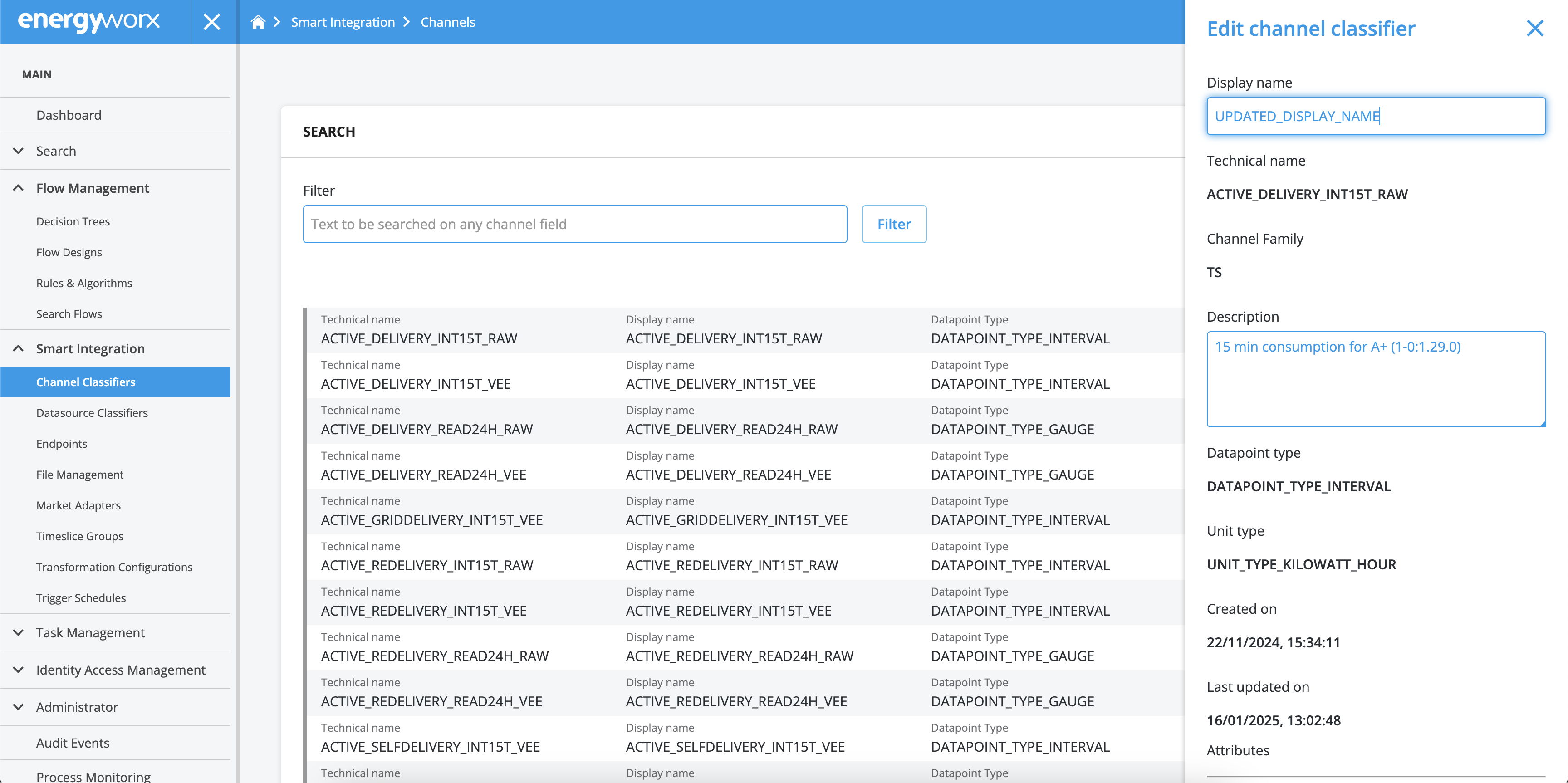
In case you need to edit the display name or the description of an already existing Channel Classifier, just take the following steps:
- Go to [Smart Integration -> Channel Classifiers] and search for the Channel Classifier you need to edit.
- Click the [Details] button on the left.
- Click the [Edit] button at the bottom of the pane.
- The Display Name and Description fields are now available to edit. The technical name cannot be changed.
- Scroll down on the pane and click [Save] when you’re done.
A channel classifier can only support Datapoint Attributes (DPAs) if it is created with at least one DPA. You can add additional DPAs later, but it is not possible to add DPAs to a channel classifier that was originally created without any.
It is also not possible to remove DPAs once added. For DPAs of type enum (Predefined value) you can extend the list of allowed values, but not remove any items from it.
Channel Family assignments are permanent. Once a Channel Family is assigned to a classifier, it cannot be changed through the platform's UI or API. Modifications to this setting can only be made through the Service Desk.