Meter Reads Processing - VEE
What it does
Billing, settlement and analytics need complete meter data of known quality. Meter Reads Processing applies Validation, Estimation and Editing (VEE) to every batch of readings as it arrives: it checks the readings against the contract, the connection capacity, the meter's own history and the register totals, fills gaps and replaces invalid values with traceable estimates, and stores the result on the metering point with a quality status on every single read.
How it works
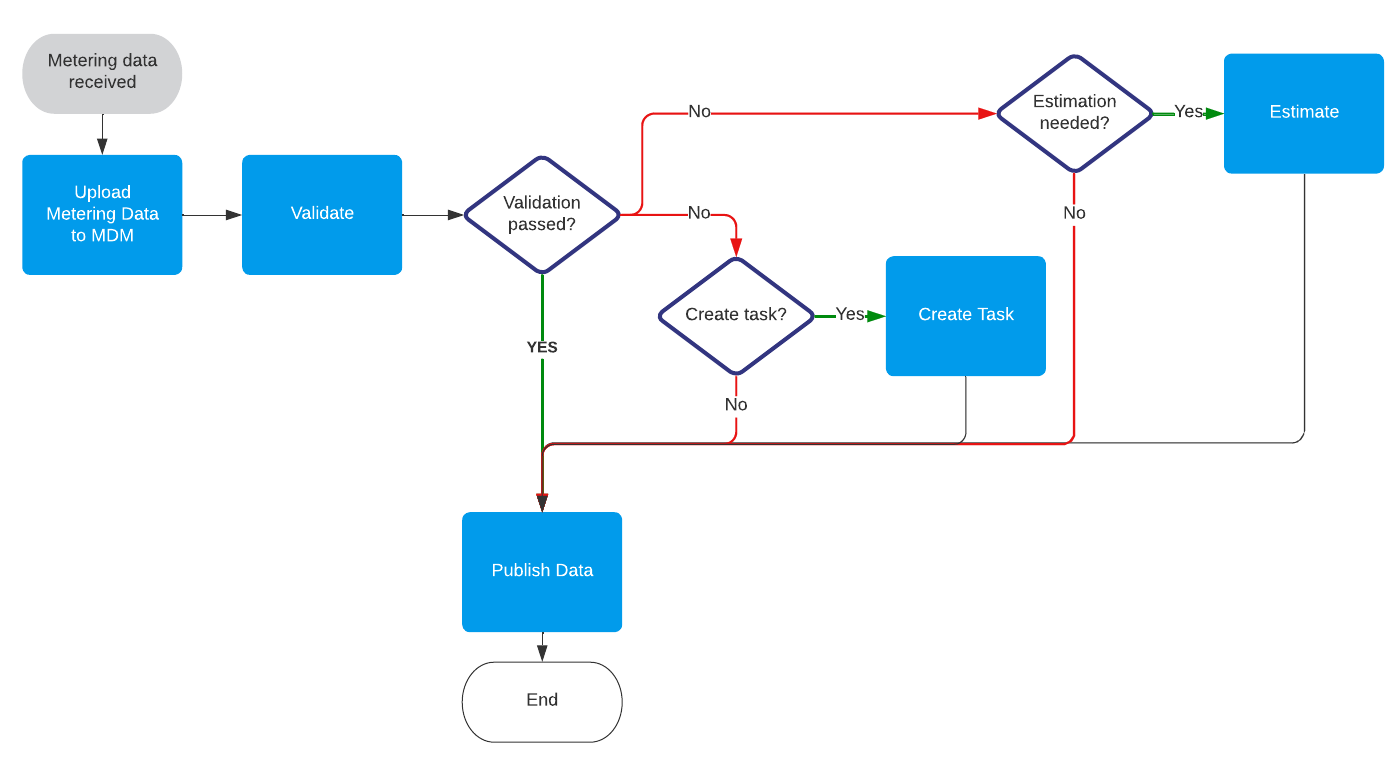
-
Receive. Interval readings for delivery and redelivery (for example 15-minute energy values) and register reads, daily and per tariff register, arrive from the head-end system. The module ships a ready-made mapping for the standard meter readings message. The raw data is stored on the meter as received, including the status codes the meter reported.
-
Derive the quality status. Meter status codes (clock set forward or backward, invalid clock, alarm, invalid measured value, power fail) are translated into one quality status per read: measured, estimated, disturbed or missing. When several codes apply, the worst one wins; a read without status codes is measured.
-
Validate. Eight validations run in sequence and flag the reads that fail as annotations:
Validation What it catches Read age Reads older than the allowed age Active contract Consumption outside the periods with an active contract Compare to threshold Values that breach a fixed threshold, out of the box negative values Max capacity Consumption above the connection capacity recorded on the network contract, beyond a tolerance Interval spike Reads that stand out against the rest of the batch by more than a tolerance Register decrease A register read lower than the previous one, allowing for meter roll-over Sum check Interval reads that do not add up to the difference between two register reads Gap check Missing reads, derived from the expected frequency of the channel -
Create tasks. The validations that point at a meter or contract problem (threshold, capacity, register decrease and sum check) create one task per datasource on the VEE task board, so operators work the exceptions instead of scanning data. See Anomaly Detection and Alerting for the path from detection to action.
-
Estimate and edit. Flagged and missing reads are replaced by estimates, each method for the situation it fits best:
- Zero read. A metering point that was switched off (see Meter Events Processing) gets zero consumption for the switched-off period.
- Linear interpolation. Short gaps, out of the box up to one hour of 15-minute reads, are interpolated between the surrounding reads.
- Average of similar days. Longer gaps, up to about a month, are filled with the average of the reads at the same time of day on similar days: the same weekday, a working day, a Saturday, a Sunday or a public holiday according to the holiday calendar of the metering point, using up to 60 days of history.
- Scale estimated intervals. When the register reads of a period are available, the estimated intervals in that period are scaled so that their sum matches the register difference.
Every estimated read gets the quality status estimated and records which method produced it, so a billing determinant or a report can always explain its figures.
-
Store and publish. The validated and estimated data is stored on the VEE channels of the metering point, separate from the raw meter data, and exported as a CSV file to the File Manager for downstream systems. Counts per quality status feed the VEE dashboard.
What you see
The VEE dashboard shows:
- the percentage of datasources with completed VEE in the last days;
- validated datasources, and datasources with validation errors, as counts and as a list;
- the number of validation errors per rule per day;
- flow errors by type, and the list of flow errors.
Validation exceptions are worked from the VEE task board. In the datasource view, every read shows its quality status and its annotations, and an estimated read shows its estimation method.
What you can configure
- The thresholds and tolerances of each validation: the allowed read age, the threshold and its comparison, the capacity tolerance, the spike tolerance, the roll-over tolerance and the sum-check tolerance.
- Which validations create tasks, and on which task board.
- The gap sizes each estimation method handles, how much history the similar-days estimation uses and whether a later estimate may overwrite an earlier one.
- Which validation findings make a read unusable as history for the estimations.
- The time zone and the format of the incoming readings, through the transformation configuration.
Verified behaviour
The package ships with automated acceptance scenarios that run against a live environment. Among others, they cover:
- a perfect batch passing through untouched;
- an imperfect batch arriving without previously stored data;
- linear interpolation of short gaps;
- average-of-similar-days estimation of longer gaps, including a gap in the history itself;
- the sum-check reconciliation of interval and register reads.
Standard rules in this module
| Rule | What it does |
|---|---|
| Standard Filter Status Storage | Derives the quality status of every read from the meter's status codes and stores it on the metering point. |
| Standard Read Age Validation | Annotates reads older than the allowed age. |
| Standard Active Contract Validation | Annotates reads that fall outside the active contract periods of the customer agreement. |
| Standard Compare To Threshold Validation | Annotates reads that fail a comparison against a fixed threshold. |
| Standard Max Capacity Validation | Annotates reads above the maximum capacity of the connection, beyond a tolerance. |
| Standard Interval Spike Validation | Annotates reads that differ from a comparable read in the batch by more than a tolerance. |
| Standard Register Decrease Validation | Annotates register reads smaller than the previous read, taking meter roll-over into account. |
| Standard Sum Check Validation | Annotates register reads whose difference with the previous read does not match the sum of the interval reads in between. |
| Standard Gap Check Validation | Annotates the missing reads of every interval channel. |
| Standard Zero Read Estimation | Estimates zero for the switched-off periods of the metering point. |
| Standard Linear Interpolation Estimation | Estimates short gaps by interpolating between the surrounding reads. |
| Standard Average Of Similar Days Estimation | Estimates longer gaps from the reads at the same time of day on similar days. |
| Standard Scale Estimated Intervals Estimation | Scales the estimated intervals of a period so that they match its register reads. |
| Standard Dashboard Report Storage | Stores the counts per quality status that feed the VEE dashboard. |
| Standard Export DF As CSV Forwarding | Exports the processed data as a CSV file to the File Manager. |
Extending the module
- Add validations of your own, for example a comparison with a forecast or with a machine learning model.
- Add channels for other commodities or resolutions by configuring channel classifiers and the mapping.
- Deliver the validated data to downstream systems by message or API instead of, or next to, the CSV export.
Installation and updates: standard-packages.