Release Notes: Version 25.01
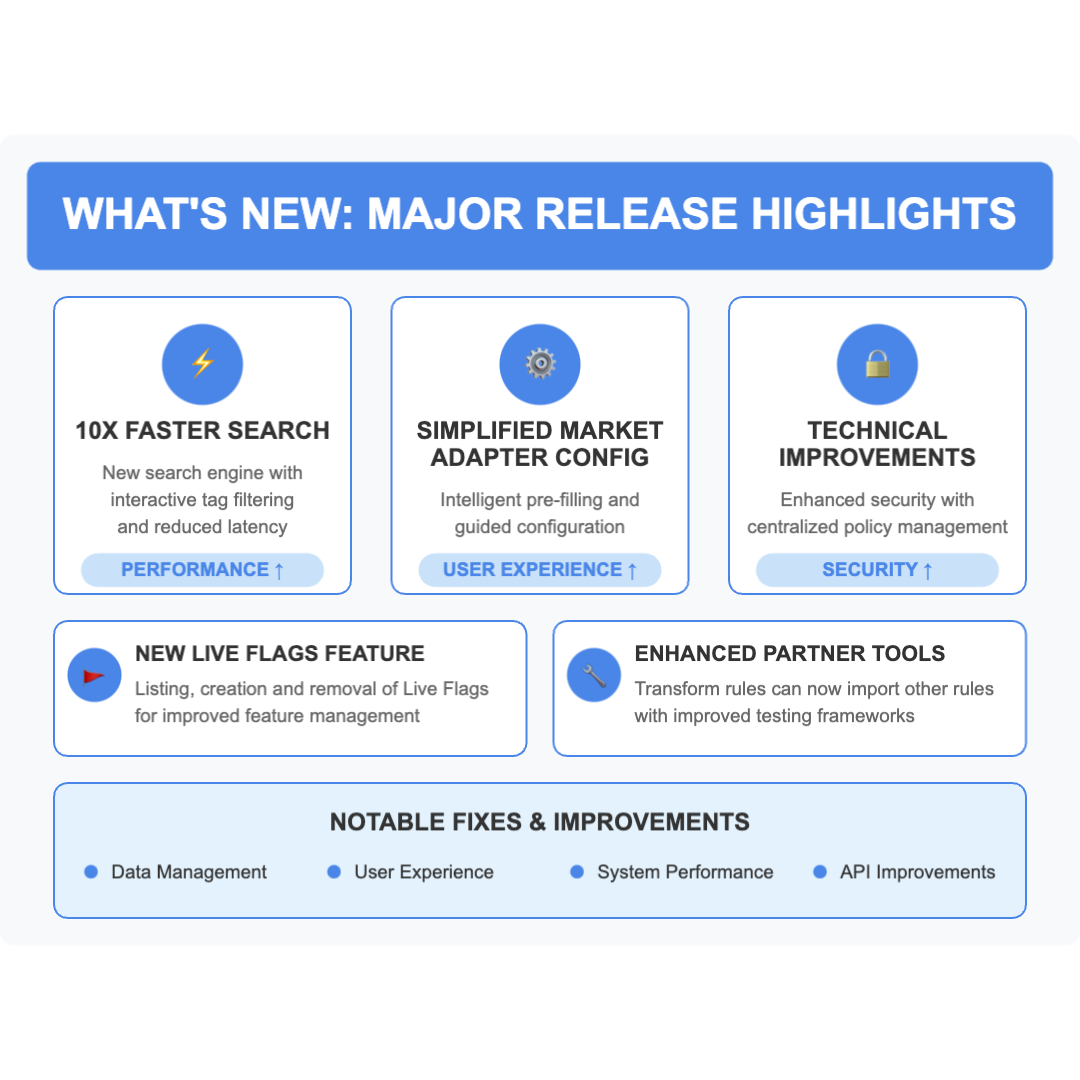
What's New
⚡ 10X Faster Search
We're excited to announce the launch of our redesigned search experience, delivering dramatically improved performance and enhanced functionality.
You told us you wanted a faster search, our new search engine delivers results at least ten times as fast as the previous version in initial tests. In addition to more responsive filtering.
Key Features
- Interactive Tag Filtering : Click directly on tags to instantly add them to your search filter Multiple tags are automatically combined with "AND" logic
- Tagged items are automatically copied to your clipboard for easy reference
- Familiar Classifier Filtering : Continue using datasource classifier filtering just as you did before
- Legacy Access Preserved : You can still access the original search page for "collections" and "bulk edit" functionality, by clicking "Go back to original view"
- Fuzzy Search: You don't need to worry about exact literal matching of the results, we'll show you the most relevant results first, but also potential matches. Additionally, It's now possible to search "ID AND tag.value=abc".
Getting Started
Visit the new search datasource page from the console sidebar to experience the performance boost immediately.
Simplified Market Adapter Configuration Experience
New market adapter creation with intelligent pre-filling and guided configuration to reduce errors and technical complexity. Explore the new market adapter configuration view when creating adapters. Original view remains accessible if needed.
Key Improvement
- Pre-populated fields with validated options for the most common market adapters (CSV, JSON, XML)
- Reduced risk of configuration errors
- Minimised input requirements
- Reduced configuration complexity
Introducing Centralised Live Flag Management
We're excited to announce the first full release of our Live Flags feature, expanding on the proof of concept previously delivered in 24.03. Live Flags now offers powerful cross-channel condition support, allowing you to create sophisticated validation rules that span multiple data streams.
Key Features
Enhanced Cross-Channel Conditions
- Multi-Channel Support : Create conditions that compare values across different channels
- Centralised Flag Management : View and manage all configured flags from a single dashboard. Add new flags with the prominent "Create New Flag" button
- Complex Condition Building : Combine conditions using AND/OR operators for precise validation rules
- Flexible Flag Types : Configure datapoints as Valid, Invalid, or Custom with corresponding colour indicators
Powerful Visualisation
- Colour-Coded Datapoints : Instantly identify valid and invalid readings in charts and tables
- Toggle Visibility : Show or hide flags directly from the datasource view
Real-World Applications Examples
Meter Reading Invalid Meter Read Conditions:
- Energy consumption (Channel A) shows activity BUT occupancy sensor (Channel B) indicates vacant property
- Meter reading shows consumption BUT circuit status (Channel C) indicates disconnection
- Reading exceeds historical maximum by 300% AND no change in customer profile
- Meter diagnostic channel shows error code concurrent with reading timestamp
Advanced Cross-Channel Use Case Examples
- Load Balancing Validation : “Invalid Reading” Flag on readings where phase balance exceeds threshold across multiple channels
- Revenue Protection : “Custom” Flag when consumption channel shows minimal use but auxiliary channels indicate activity
- Equipment Performance Monitoring : Flag when efficiency ratio between input and output channels falls below expected value
Getting Started
To access the new Live Flags feature:
- Navigate to the Smart Integration menu
- Select “Live Flags”
- Browse your existing flags or click "Create New Flag" to configure cross-channel validation rules
Known Issue
When assigning Datapoint Attributes of type enum, then the console at the moment expects the enum numerical value (and not the enum display text), we’re working on improving this user experience.
Documentation Updates
- Users can now access our knowledge base from the platform’s side menu
- Renamed "Run" section to "Flow" and "Integration" to "Transformation Configuration" in API v1.5 docs
- The API documentation is now sorted alphabetically, and APIs descriptions are visible again
Added Partners Tools
- Transform rules can now import other rules (including any other type, as long as it derives from AbstractRule)
- Now pytest-bdd is available for the clients in GAR (python-shared repository) of the global project
- Added Cucumber-style BDD statements for pubsub client usage in testing
pytest-bdd-ewxframework that can be used in automated testing- Native support for pubsub client usage in Behaviour-Driven Development (BDD) tests
- Streamlined test scenario development for pubsub-based workflows
- New
slice_by_versionmethod for the TimeseriesData object. When calling this function with a version timestamp, it returns a dictionary with the version and a TimeseriesData object containing only the data for that specific version. If no version is supplied, the dictionary contains a TimeseresData object for every version in the data - Introduced a new method to the TimeseriesService called get_versions that can retrieve multiple versions of timeseries data
- Added a new argument for the TimeseriesData.as_df function called multiple_versions. When this is set to True, it will return all available versions of the data as a multi-index DataFrame. When multiple_versions is set to False, it will only return the latest version of the data as a single-index DataFrame. It is set to False by default
- Added validations to
create_taskmethod in the rule framework. Now this function will validate:- Required fields are filled in:
- title
- task_type
- status
- priority
- Converts single item types to lists for corresponding fields (aggregation_configurations, tags, taskboards)
- Type validation for all the fields
- Required fields are filled in:
- Introduced new way of stopping flows. This new method added the ability to persist the flow data that was saved up to the point where the flow is stopped by the user code
- Added in-memory caching implementation to apiv2
- Finalise the EnerGPT chatbot and release of the first version
API Changes
New Endpoints
- Added new API endpoint for datasource details that correctly splits Channel Properties from Tags
Modified Endpoints
- Channel classifier IDs are now case-insensitive
- Fixed issue with index_time Lesser and LesserOrEqual filters not working correctly. This change enforces that the timestamp provided is in the RFC3339 format and in UTC
- Added API validation for channel families
- Consistently returns 404 when no channel families are present
⚠️ Deprecated Functionality
We've removed deprecated API endpoints:
- GeoCodeBoundary
- Raw metrics
- Flow metrics
- TransportAdapter
- You can use Energyworx Integration components
TL;DR: Technical Improvements
Performance Enhancements
- Added search by tag functionality to APIv2. Can reach up to a 10x speed improvement compared to the current API for certain cases Reduced the minimum Number of Pods used by the API Workload, resulting in leaner platform footprint
- Parallel flow execution & optimized resource usage across the platform
- Improved chart loading times and smarter API scaling
Security & Infrastructure:
- Centralized policy management with Open Policy Agent integration
- GKE upgraded to v1.31+ with next-gen cloud infrastructure
- Modern machine types for all workloads, improving overall system efficiency
⚠️ Breaking Changes
- Removed Channel Family POST and PATCH via API v1. GET functionality remains to maintain support. Channel families are now created and maintained via API v2
- Changed partition field from to insert_ts . This partition scheme gives more flexibility so it can be queried by seconds on the insertion time of a givenrow. Queries in EQL or Dashboard can use this new field. _PARTITIONTIME will be deprecated according to our deprecation policy, however, it can still be used until the moment it is deprecated
Notable Improvements and Fixes
Data Management
- Fixed issue with datapoint edits incorrectly using continuous mode when datasource flows are setup
- Fixed issue with edits not being loaded on timeseries data for datasource flows when no source channel data is present
- Original Datasource view - Fixes an issue where editing a datapoint with '0' value, removed the datapoint from the editing view
- Fixing restoring historical versions of flow configurations for datasource flows
- DPA of type "long" properly shows negative values now in the original console datasource view
- Fixed APIv2 issue where Annotations would not be returned
- Fix to set DPA LONG attributes to a string when rendering on FE instead of a number which avoids NaN errors
- It is possible to add data from other datasources to self.dataframe when using store_timeseries
- Fixed issue with writing NaN Timeseries values using API v2
- Editing data points value from the chart works as expected
User Experience
- Channel classifiers page now show user friendly names for datapoint and unit types instead of technical names.
- BEFORE: "CC_TEMP_A_" → AFTER: "Temperature Reading"
- Added a loader to channel family creation page for better user experience
- Adds tags in the expandable details of each datasource
- Under the user profile namespace selector, namespaces available to the user are sorted alphabetically
- Formats month(s) the same as version(s) for Channel Family retention policy
- Loading more results by "Show more" button no longer refresh the whole page on new console
- Improved console handling of invalid inputs for adding datapoint attributes to channel classifiers via new view, now a proper error message shows up
- Previously, widgets without a configured time period would incorrectly display a default timeframe in the information panel when a widget description was present. This could mislead users about the data's time scope
- Eliminated unnecessary Tags endpoint calls when changing dates on the datasource page
- Clarified what types of values are affected by edits by splitting the audit event to report the number of datapoints and the number of annotations edited instead of displaying them together
- When a flow tries to import a rule that doesn't exist an audit event with error message is shown
- Task descriptions rendering are no longer limited to 1k characters
- Corrected inconsistent highlighting of editable cells in the New User Interface (NUI)
- Invalid dates no longer accepted in the calendar on audit events page new view
- Fixed an error in the labelling of AND and OR in Channel Families
- Dashboard graph widget rendering as expected
- Created on date on file manager is showing correct date, Created on date am and pm is shown as expected
- A graph widget query startdate is based on UTC
- Fixes some datasource detail quirks, such as:
- Load All Channels button should be disabled if all the channels are loaded
- Date picker filter isn't using user settings preferences
- Larger font on graph
- Removes datasource view accordion in settings
- Removes feedback X for source datasources not editable feedback panel
System Performance
- Addressed a caching delay affecting the recognition of newly added Data Point Attributes (DPAs) in channel classifiers on API v1.5
- Before: New DPAs were not immediately recognised, causing ingestion failures
- After: Reduced latency in DPA recognition, enabling faster file ingestion
- Eliminated unnecessary Tags endpoint calls when changing dates on the datasource page
- Before: Changing dates triggered redundant Tags endpoint calls
- After: Reduced network calls, improving page load performance
- Changed the behaviour of internalising queries from Advanced Search
- Audit events table queries now preserve original field names
- Example: "id" remains unchanged in audit events queries
- Multi-table queries continue existing internationalisation process
- Reduced unnecessary query translations
- More precise query handling for audit event searches
- Corrected unexpected timezone handling for timestamp-based Data Point Attributes (DPAs)
- Propagating the google exceptions (DeadlineExceeded, RetryError) to be retried
- Fixes on VDS execution:
- API request is asynchronous for those long-running aggregations
- Performance optimisations on aggregation execution
- Moved the user timezone to UTC for proper queries on the user dashboard
- Adding retry in prepare source data logic
- Fixed duplication of tasks statuses and task types when uploading their configs with ewx-cli
- Fixed issue when creating/updating rules. Now we check the status code of the response, and return the correct error message based on the response data
25.01 Minor Release 1
Highlights
- Improved Data Point Editing : Fixed issues with negative values and enhanced editing experience
- Enhanced Search Capabilities : Channel filters now work with both Display Names and Technical Names
- Better Tag Management : Improved visibility and functionality across the platform
- UI Enhancements : More intuitive colour selection and timezone consistency
Fixes & Improvements
Data Management
- Negative Values Support : Fixed issue where numbers couldn't be edited to be negative during datapoint edits in the NUI
- Channel Family API Compatibility : Added support for APIv1 created Channel Families in APIv2
- Tag Search Enhancement : Channel Properties are now returned by the tag search endpoint (datasource/search) in APIv1
- Datasource Classifier Management : Fixed issue where classifiers couldn't be changed twice on Datasources
User Experience
- Display Name Filtering : Now it's possible to filter legend channels by their display names, not just Technical Names
- Chart Visibility Improvements :
- Usability improvement to selectable colors in the chart legend
- Eliminated invisible colors for better chart visualization
- Time Zone Consistency : Timeseries data time zone now matches dashboard graph's x-axis, which shows UTC time
- Dashboard Results Limit : Increased the configurable results limit in dashboard widgets to 1000
Tag & Property Management
- UI Improvements for Property Keys :
- Corrected display issues with technical property keys
- Fixed tag width display problems
- Added direct links from property values to related datasource detail pages
System Performance
- Channel Visibility Caching : Default visible channels are now cached at the classifier level, ensuring accurate channel lists
- Timeseries Data Loading : Fixed issue with loading timeseries not appearing when edits were excluded
- Flow Labeling : Fixed labeled flows to use the correct workloads
Platform Cleanup
- Legacy Component Removal : Removed transport functions from the platform navigation for a cleaner interface
Developer Notes
- Fixed issue with loading timeseries for TIMESERIES_VIEW_BASIC and TIMESERIES_VIEW_INCLUDE_FLAGS filters
- Tags are now properly added via ingestion flow for datasources created via API v2
- Fixed internal issues with version handling when listing timeseries with annotations
25.01 Minor Release 2
Highlights
- Custom transform rules can now be configured for a tag’s
valid_fromfield in the Transformation Configuration. - Fixed an issue where datasource search on the console would not work without providing a datasource classifier filter, now it is possible to search without it.
- Users can view flags as disconnected points on the chart
- General availability of EnerGPT
- Added retry for pubsub exeception in market adapt logic
- Fixed an issue where querying timeseries didn't show all Datapoint Attributes.
- Fixes audit event api call loops that occurred when API returned 200 OK status but error response
- Fixed bug in JSON Market Adapter to allow the ingestion of multidimensional xml files.
- Idempotency for storing the tags once when the file is ingested multiple times.
- Cleaned up the chart export to include only the necessary data.
25.01 Minor Release 3
Highlights
- New Search, datasource and refreshed views available in preview