Implementation Overview
The SOAP Message Service is the platform's regulated market communication capability: bidirectional message exchange with energy market hubs, with schema (XSD) validation, message signing, acknowledgement tracking, routing, and automatic creation of a Task Management task when a market party rejects a message.
Market Context
The SOAP Message Service Integration made its debut in the Dutch energy market through integration with the TenneT Market Message Communication Hub (MMC-Hub). This implementation serves as a reference architecture for future market integrations, demonstrating the platform's capability to handle complex market communications while maintaining scalability and reliability. The platform has since been extended to support SFTP-based integrations, providing flexibility for different market communication protocols.
Implementation Overview
Our implementation delivers both asynchronous and synchronous message processing capabilities through multiple protocols:
- SOAP Asynchronous (MMC-Hub): Four-component architecture for async message exchange
- SOAP Synchronous (EDSN): Single-component synchronous request-response processing
- SFTP File-Based: Three-component architecture for file-based message exchange
All integrations share a unified scheduler architecture that runs as a single cronjob. The scheduler uses a scheduling manager with protocol-specific handlers (SOAP and SFTP) to check for new messages across all configured sources and namespaces.
Architectural Overview
The platform processes messages from multiple sources and protocols:
- SOAP Integrations: Poll SOAP hubs (MMC-Hub, EDSN) for messages using credentials
- SFTP Integrations: Connect to SFTP servers to retrieve files based on schedules
- Unified Processing: Both protocols use shared components for validation, audit, and forwarding
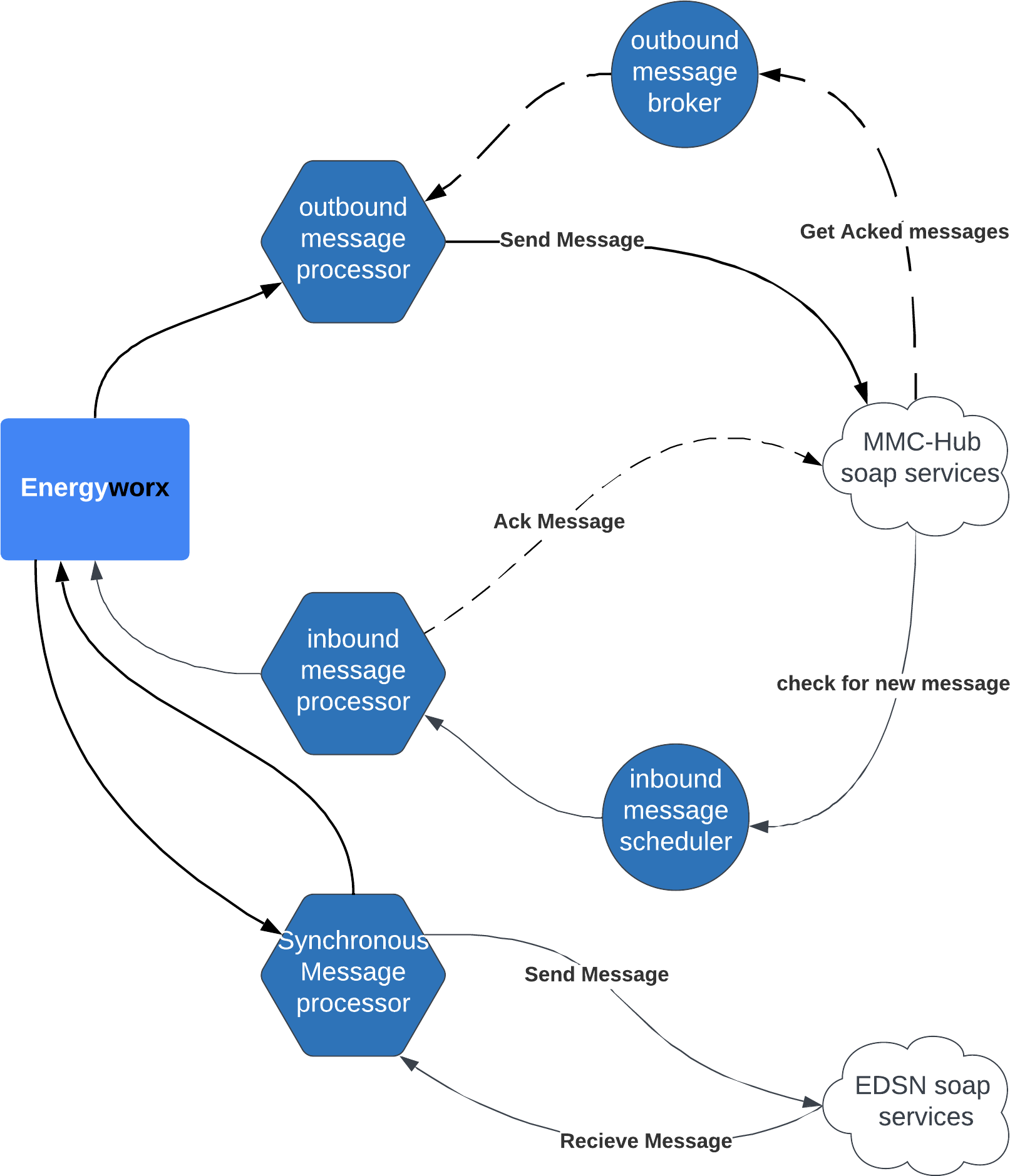
Diagram showing the SOAP integration flow
SOAP Message Flow (Asynchronous)
The inbound message scheduler checks for new messages in the MMC-Hub using configured credentials for each namespace. If messages are available, they are pulled from the SOAP-Hub and sent to the Inbound message processor. The Inbound message processor validates the message and forwards it to Energyworx. After validation, an acknowledgement is sent back with the status (success or specific error code).
The outbound message processor receives outbound messages from Energyworx, validates the message structure with XSD, creates and signs a SOAP message, and sends it to the MMC-Hub. If accepted, the outbound message broker checks the SOAP-Hub for acknowledgements. Once received, it verifies the market party's acceptance status and creates tasks in task management if issues are found.
SOAP Message Flow (Synchronous)
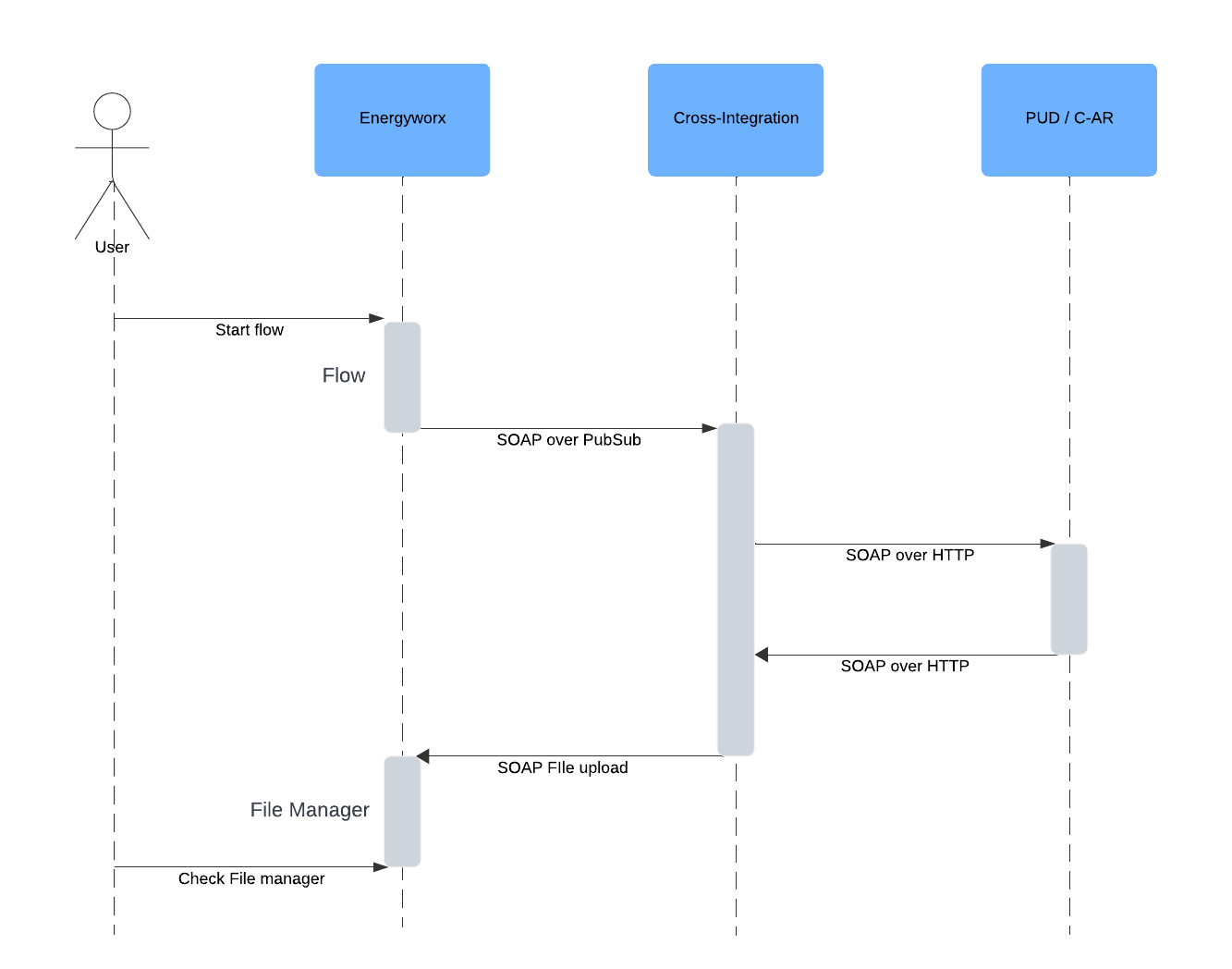
The synchronous Message processor sends a message to the EDSN hub and receives a response in the same HTTP session. The response is processed and sent to the filemanager.
SFTP Message Flow
The SFTP scheduler connects to configured SFTP servers based on schedule timing and retrieves files matching configured patterns. Files are grouped by message type and sent to the Inbound message processor. The processor downloads files, validates them (optionally), forwards them to filemanager, and archives them on the SFTP server. Unlike SOAP, SFTP does not support acknowledgements.
For detailed SFTP routing and scheduling information, see SFTP Routing and Scheduling.
The current implementation consists of four parts for Asynchronous SOAP processing (MMC-Hub), one part for the synchronous SOAP processing (edsn), and three parts for SFTP-based message exchange.
In a closer look, we also see what infrastructure services and interfaces the process implements.
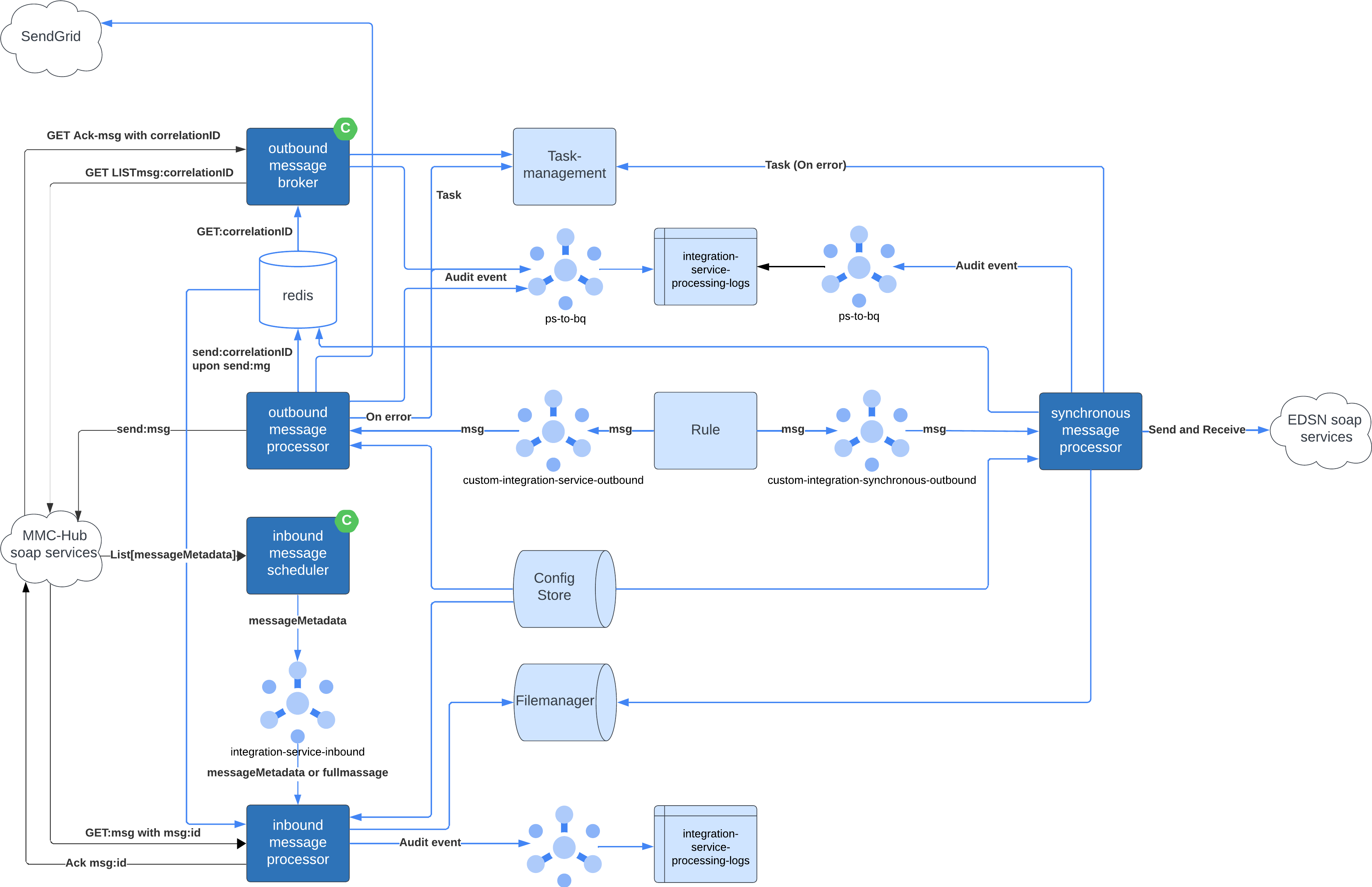
Asynchronous Message Processor
Inbound Message Scheduler
Type : Cronjob
Interfaces
| type | protocol | name | description |
|---|---|---|---|
| soap | https | TenneT MMC-Hub | Dutch TSO energy market hub |
| Pub/Sub | http(s) | integration-service-inbound | topic |
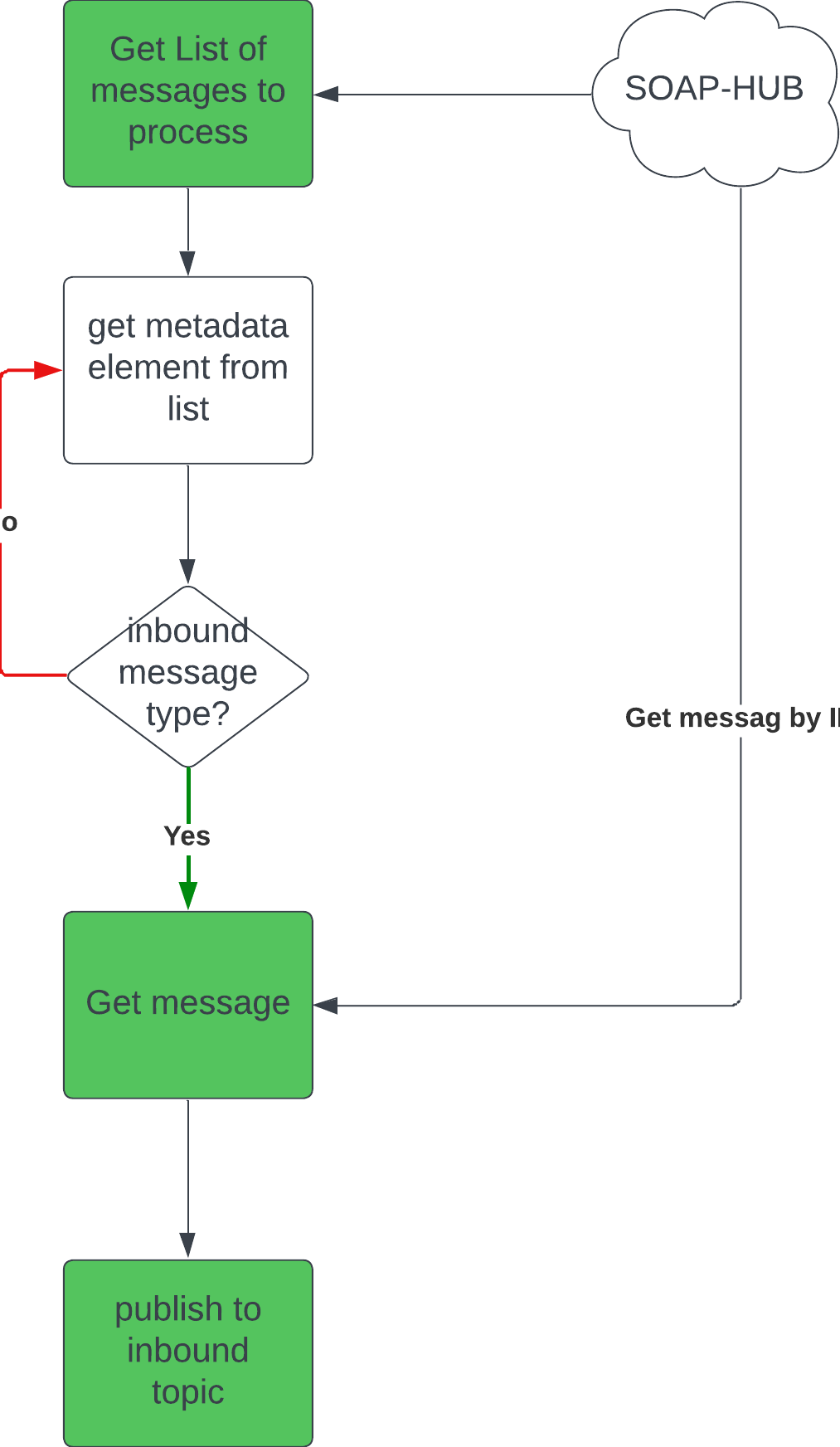
This service performs a List operation on the SOAP-Hub messages that are ready to be picked up. If it returns something, it will pull the message from the SOAP-Hub and send it to the queue for the Inbound Message Processor
The polling schedule is defined in schedules/schedule_config.json in the configuration bucket — a schedule entry with "type": "soap" is required for SOAP inbound polling, the same mechanism used for SFTP. The schedule entry's connection_id points at the connection entity (connections/{connection_id}.json), which carries the party identifier (party_id, for MMC-Hub the receiver EAN) and the enabled flag; a disabled connection is not polled. Per-namespace reroute targets are set on the schedule's namespace entries. See the Configuration Reference for the file structures. Schedules, receiver EANs, and send/skip behavior are not configured in the service settings (the former INBOUND_SCHEDULE, RECEIVER_EAN, FALLBACK_EWX_NS, and SKIP_SENDING settings are no longer used).
Most important implementations is the SoapService
Inbound message processor
Type : Deployment
Interfaces
| type | protocol | name | description |
|---|---|---|---|
| soap | https | TenneT MMC-Hub | Dutch TSO energy market hub |
| Pub/Sub | http(s) | integration-service-inbound | subscription |
| Pub/Sub | http(s) | ps-to-bq | topic for audit events to BigQuery |
| REST | http(s) | <project>-integration-service | storage bucket with configuration |
| REST | http(s) | filemanager | storage bucket |
| REST | http(s) | Redis | state for validation of sequences. |
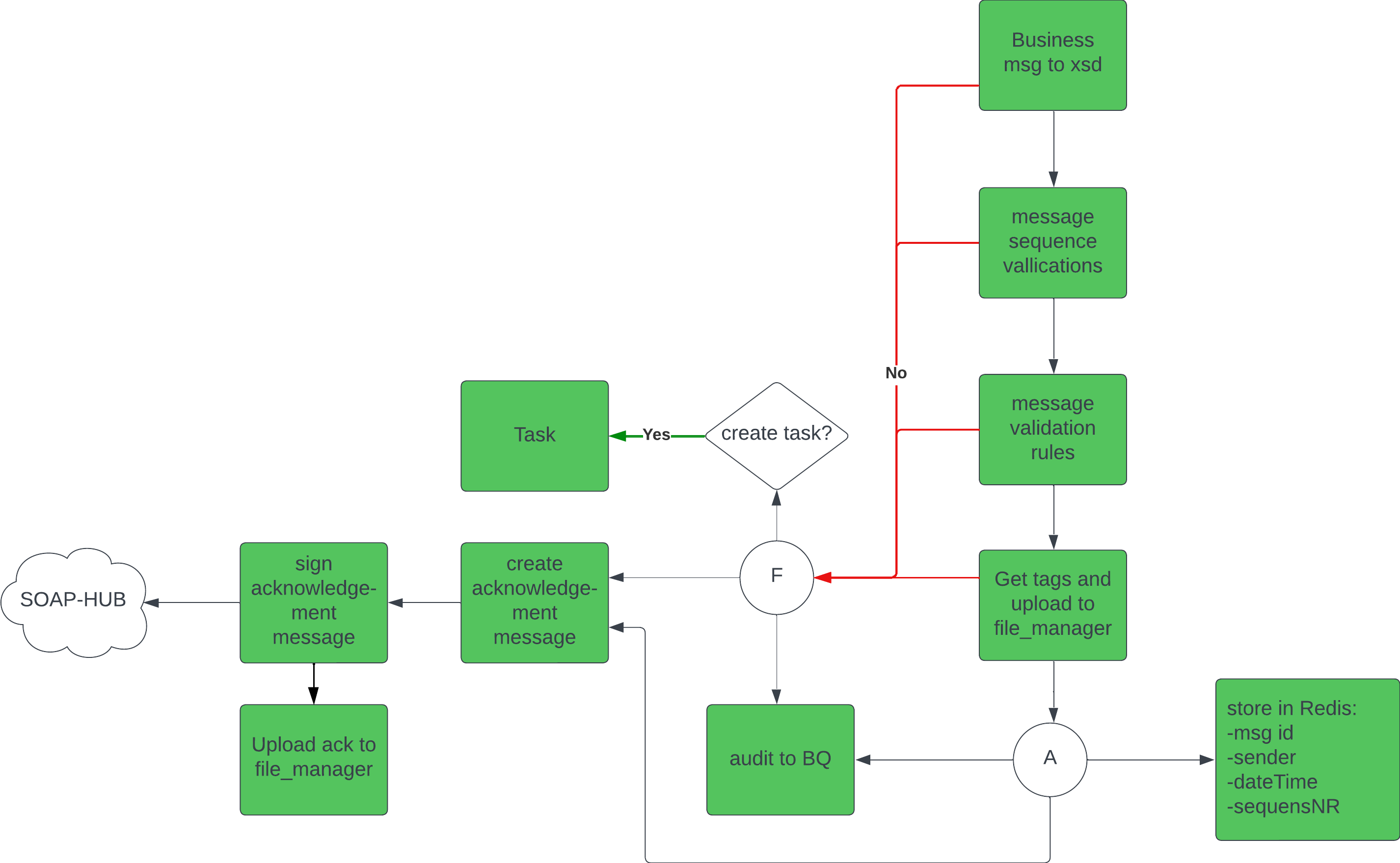
This service receives messages from the scheduler and processes them. The flow for message processing includes sequence validation , XSD schema validation, and custom message validations.
It handles errors and exceptions, logs audit events, and forwards processed messages to inbound cloud storage location (the filemanager).
When the message is processed, it generates an acknowledgement and sends it back to the SOAP-Hub (and also to the file-manager). If there are errors that require a human check, a task will be created in the taskmanager
Outbound message processor
Type : Deployment
Interfaces
| type | protocol | name | description |
|---|---|---|---|
| soap | https | TenneT MMC-Hub | Dutch TSO energy market hub |
| Pub/Sub | http(s) | custom-integration-service-outbound | subscription |
| Pub/Sub | http(s) | ps-to-bq | topic for audit events to BigQuery |
| Pub/Sub | http(s) | custom-ps-to-email | topic for sending email |
| REST | http(s) | <project>-integration-service | storage bucket with configuration |
| REST | http(s) | Energyworx/api/taskmanagement | ewx rest api for creating tasks |
| REST | http(s) | Redis | storing correlation id’s etc |
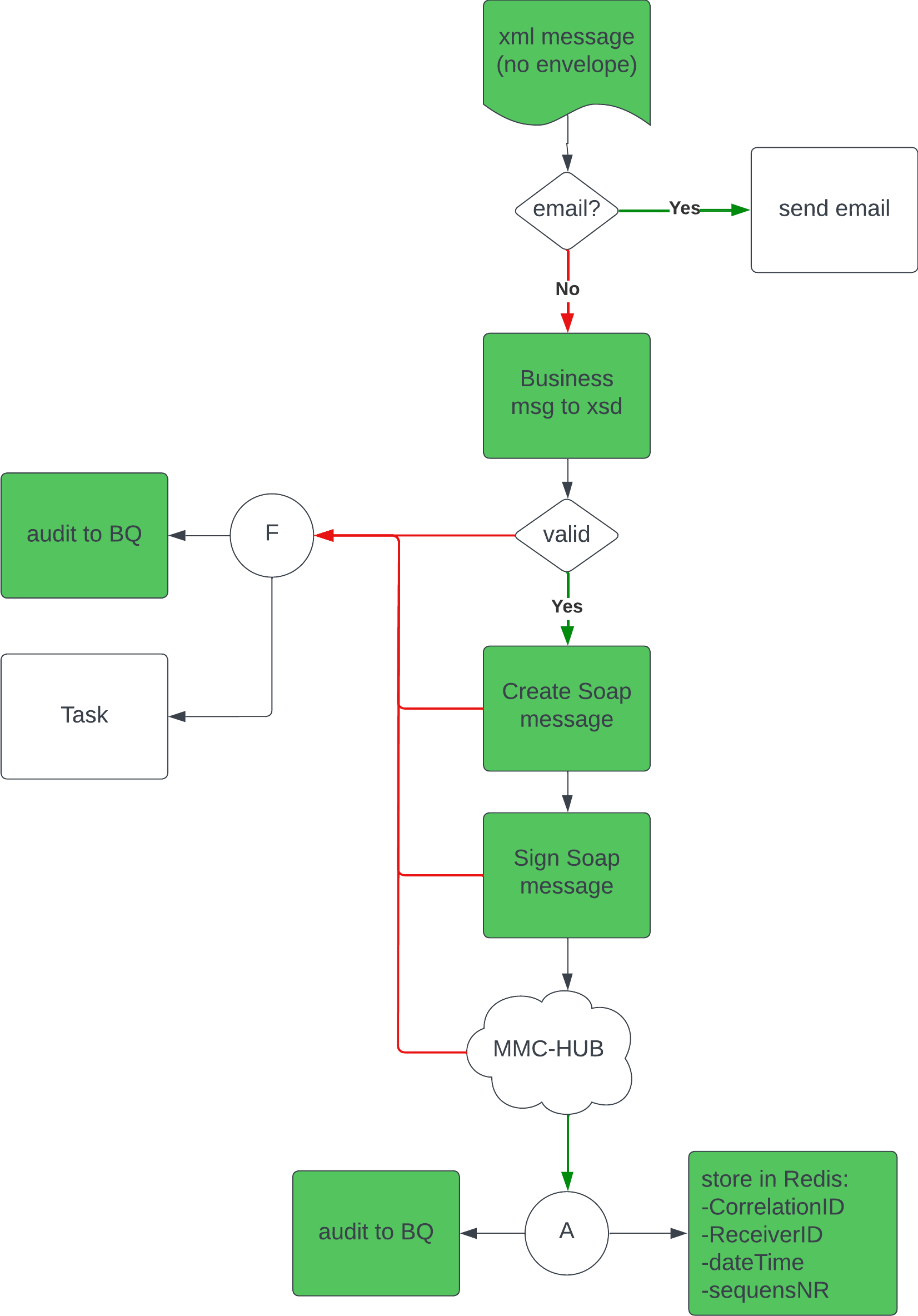
This service handles the outbound messages. It first checks what type of message has been sent out by the Energyworx application. If it’s an email, it will check for valid receivers, and (b)cc address, and send out the email. Otherwise, it will first perform the XSD schema validation. If the structure of the message is good, it will create and sign a soap message and send it to the SOAP-Hub. The correlationId of the message is stored so that the Outbound Message Broker can check for acknowledgements. The process outcome is logged as an audit event, and If there are errors that require a human check, a task will be created in the taskmanager.
Outbound message broker
Type : Cronjob
Interfaces
| type | protocol | name | description |
|---|---|---|---|
| soap | https | Tennet MMC-Hub | Dutch TSO energy market hub |
| Pub/Sub | http(s) | ps-to-bq | topic for audit events to BigQuery |
| REST | http(s) | Energyworx/api/taskmanagement | ewx rest api for creating tasks |
| REST | http(s) | Redis | retrieving correlation id’s etc. |
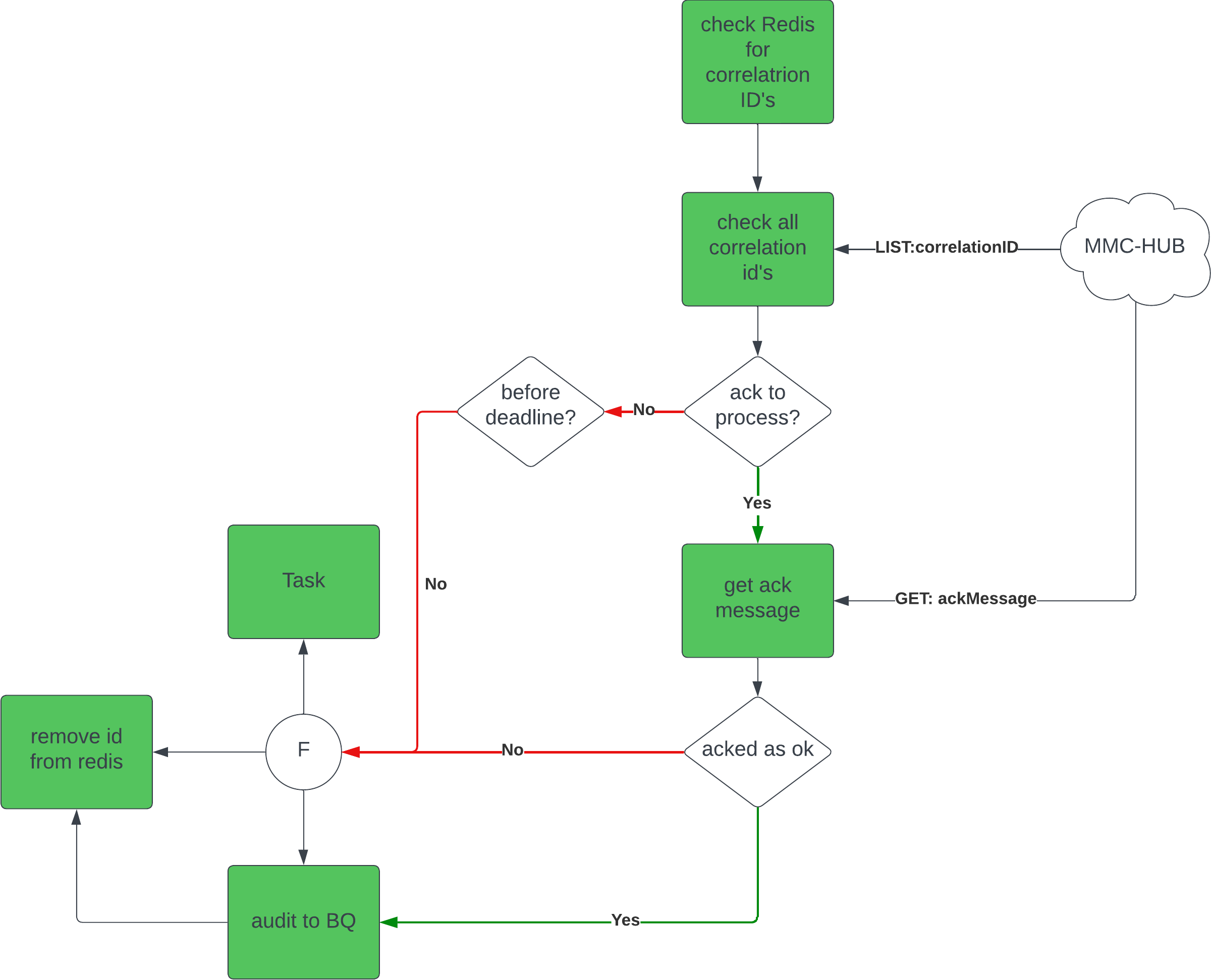
This service pulls a set of correlationIds from Redis and checks for every id if there is an acknowledgement ready in the SOAP-Hub. If there is an acknowledgement, it pulls it from the SOAP-Hub, checks the acknowledgement status and logs this as an audit event. If the status is not ok, it also creates a task in task management. After processing an acknowledgement, it is sent to the file-manager. If the id is not yet acknowledged, it checks if the deadline is passed. If so, it also created an audit event and creates a task in taskmanager. The last step is to remove the id from the set. If the deadline is not passed, it leaves the id for the next run.
Synchronous Message Processor
The Synchronous Message Integration works similar to the outbound messages towards the SOAP-Hub, a message can be sent from an Energyworx rule (see Energyworx platform below), and the response will be ingested.
Topic: integration-synchronous-outbound
SFTP Message Integration
The SFTP integration provides file-based message exchange capabilities, enabling secure transfer of messages via SFTP protocol. This integration supports both inbound and outbound message flows without the complexity of SOAP envelope wrapping.
SFTP Inbound Message Scheduler
Type : Cronjob
Interfaces
| type | protocol | name | description |
|---|---|---|---|
| SFTP | sftp | SFTP Server | Configured SFTP endpoint |
| Pub/Sub | http(s) | integration-service-inbound | topic |
This service performs a list operation on the configured SFTP server to discover new files ready to be picked up. The scheduler:
- Connects to the SFTP server using configured credentials (username/password stored in Google Secrets)
- Lists files in the configured source folder
- Filters files based on allowed extensions (e.g., xml, txt, csv)
- Groups files by message type (identified by filename patterns)
- Publishes processing triggers to the Pub/Sub topic for the Inbound Message Processor
The message type is extracted from the filename. For example, files matching "DRE_*.xml" are grouped as message type "DRE".
Most important implementation is the SftpService
SFTP Inbound Message Processor
Type : Deployment
Interfaces
| type | protocol | name | description |
|---|---|---|---|
| SFTP | sftp | SFTP Server | Configured SFTP endpoint |
| Pub/Sub | http(s) | integration-service-inbound | subscription |
| Pub/Sub | http(s) | ps-to-bq | topic for audit events to BigQuery |
| REST | http(s) | <project>-integration-service | storage bucket with configuration |
| REST | http(s) | filemanager | storage bucket |
| REST | http(s) | Redis | state for tracking processed files |
This service receives SFTP processing triggers from the scheduler and processes them. The flow includes:
- File Download: Downloads the file from the SFTP server with retry logic
- Message Object Creation: Creates a message object using configured field mappings
- XSD Validation: Validates the message structure against the configured XSD schema (if present)
- File Forwarding: Forwards the processed message to the filemanager
- Archiving: Moves the processed file to an archive folder on the SFTP server
- Deduplication: Uses Redis to track processed files and prevent duplicate processing
Error handling creates audit events and prevents re-processing of failed files.
SFTP Outbound Message Processor
Type : Deployment
Interfaces
| type | protocol | name | description |
|---|---|---|---|
| SFTP | sftp | SFTP Server | Configured SFTP endpoint |
| Pub/Sub | http(s) | custom-integration-service-outbound | subscription |
| Pub/Sub | http(s) | ps-to-bq | topic for audit events to BigQuery |
| REST | http(s) | <project>-integration-service | storage bucket with configuration |
This service handles outbound messages sent to SFTP endpoints. The process includes:
- Message Reception: Receives messages from the outbound Pub/Sub topic
- Message Parsing: Creates message object from the payload
- XSD Validation: Validates the message structure (if schema is configured)
- File Upload: Uploads the message as an XML file to the configured SFTP folder
- Audit Logging: Logs the processing outcome to BigQuery
Unlike SOAP-based integration, SFTP does not support acknowledgements, so no broker service is needed.
SFTP Configuration
SFTP connections require the following configuration elements:
Connection Configuration (stored in connections/<connection_id>.json):
{
    "id": "connection_identifier",
    "host": "sftp.example.com",
    "auth": {
        "type": "basic",
        "username": "sftp_user",
        "pw_secret_key": "projects/<project-id>/secrets/<secret-name>"
    },
    "port": 22,
    "source_folder": "upload",
    "allowed_extensions": ["txt", "csv", "xml"]
}
Field Map Configuration (stored in field_map_configs/<message_type>.json):
Defines how to extract and construct message fields from the file content. See the Message Mapper documentation for detailed field mapping functions.
File Tags Configuration (stored in file_tags/<message_type>.json, optional):
Defines tags to be applied in the FileManager for the processed files. When omitted, files get only the default MessageType and MessageStatus tags.
Response Configuration (stored in response_configs/<message_type>.json):
{
    "msg_type": "message_type",
    "ns": "",
    "default_reason_code":"00",
    "archive_location":"archive"
}
For a complete field-by-field description of every configuration file, see the Configuration Reference.
Energyworx platform
To send a message towards the integrated systems, the following rules are available:
- Library rule:
XML Message Builder - Message builder rule:
Construct <message_type> - Publish rule:
Publish Outbound Message- Has to use the correct topic:
- For asynchronous services, such as MMC-Hub:
custom-integration-service-outbound - For synchronous services, such as PUD / C-AR:
integration-synchronous-outbound
- For asynchronous services, such as MMC-Hub:
- Has to have the
message_typein the attributes.
- Has to use the correct topic:
Task Creation
We integrate with the Energyworx API for the systematic creation of tasks.
Gaining Access to Energyworx API
- The integration services authenticate against the Energyworx identity service using the OAuth2 client credentials grant: at runtime a short-lived access token is requested from the identity service token endpoint, cached until (nearly) expired, and re-requested when needed.
- A dedicated integrations client credential is provisioned per environment and its
client_id/client_secretare stored SOPS-encrypted in ewx-config; deploys inject them into the services as a Kubernetes Secret. - See the how-to guide How to set up integration client credentials for the full setup (provisioning, secret storage, configuration, and the runtime token flow).
Task Configuration in Energyworx
- We have predefined task types within the Energyworx application, each associated with a set of statuses, with 'open' being the mandatory minimum status.
- Tasks are allocated to specific taskboards, the identifiers of which are preserved as a dictionary within our environment variables (namespace: taskboardID).
Audit events
To provide comprehensive insights into our system's operations, we employ a logging service that writes data to BigQuery. This allows for the generation of detailed reports and dashboard visuals within the Energyworx application.
Log Data Structure
- Our system publishes logs to a custom topic (
ps-to-bq), which validates incoming messages against a defined schema before they are recorded in theintegration-service-processing-logstable.
The log schema includes fields such as participant_id, message_type, and process_type_id, among others, ensuring a comprehensive capture of event details.
Configuration Management
Primary configurations, like XSDs for message validation, tag-mappings, and validation rules, are maintained within a dedicated Google Bucket.
Configuration Directories
- Maps Directory: This directory stores all the mappings of different file types going in and out of the integration service. The values retrieved are used in other parts of the integration service. (Applicable to SOAP messages)
- Schemas Directory: This directory stores all the XSD files. Each XSD is named identically to the message type it validates, ensuring a direct correlation between incoming messages and their respective validation schemas. (Applicable to both SOAP and SFTP when validation is required)
- Tags Directory: Here we house the mappings for tags used within the FileManager. The mappings are presented in a JSON format where each tag name is associated with the name/xpath of the XML element it represents. Deprecated because this is added to the mapping.
- Rules Directory: This directory contains JSON files with validation rules. Each file is named in the format messageType_MessageProcessTypeId. The rules define the criteria against which message elements are validated. (Applicable to both SOAP and SFTP when validation is required)
- Config Directory: This directory contains JSON file
message_config.json. the file contains al the configuration items per message type where the rules, xsd's and mappings can be found. See the page Message Config for more details. (Applicable to both SOAP and SFTP) - Connections Directory: This directory contains JSON files defining connection configurations for SFTP servers. Each file specifies host, port, authentication details, source folders, and allowed file extensions. (SFTP-specific)
- Field_Map_Configs Directory: This directory contains JSON files with field mapping configurations for SFTP message types. These define how to extract or generate message fields from SFTP files. (SFTP-specific)
- File_Tags Directory: This directory contains JSON files that define which tags should be applied in the FileManager for each SFTP message type. (SFTP-specific)
- Response_Configs Directory: This directory contains JSON files with response and archive configurations for SFTP message types, including archive locations and default reason codes. (SFTP-specific)