Meter Reads Processing - VEE
Overview
The Meter Reads Processing module icludes Validation, Estimation, and Editing (VEE) processes for meter readings to ensure data quality and completeness. This process validates incoming data, estimates missing or invalid data points, performs any necessary editing, and prepares the data for downstream processes.
Supported Message Types
The system supports the following meter reading message formats:
- MeterReadings
Process Flow
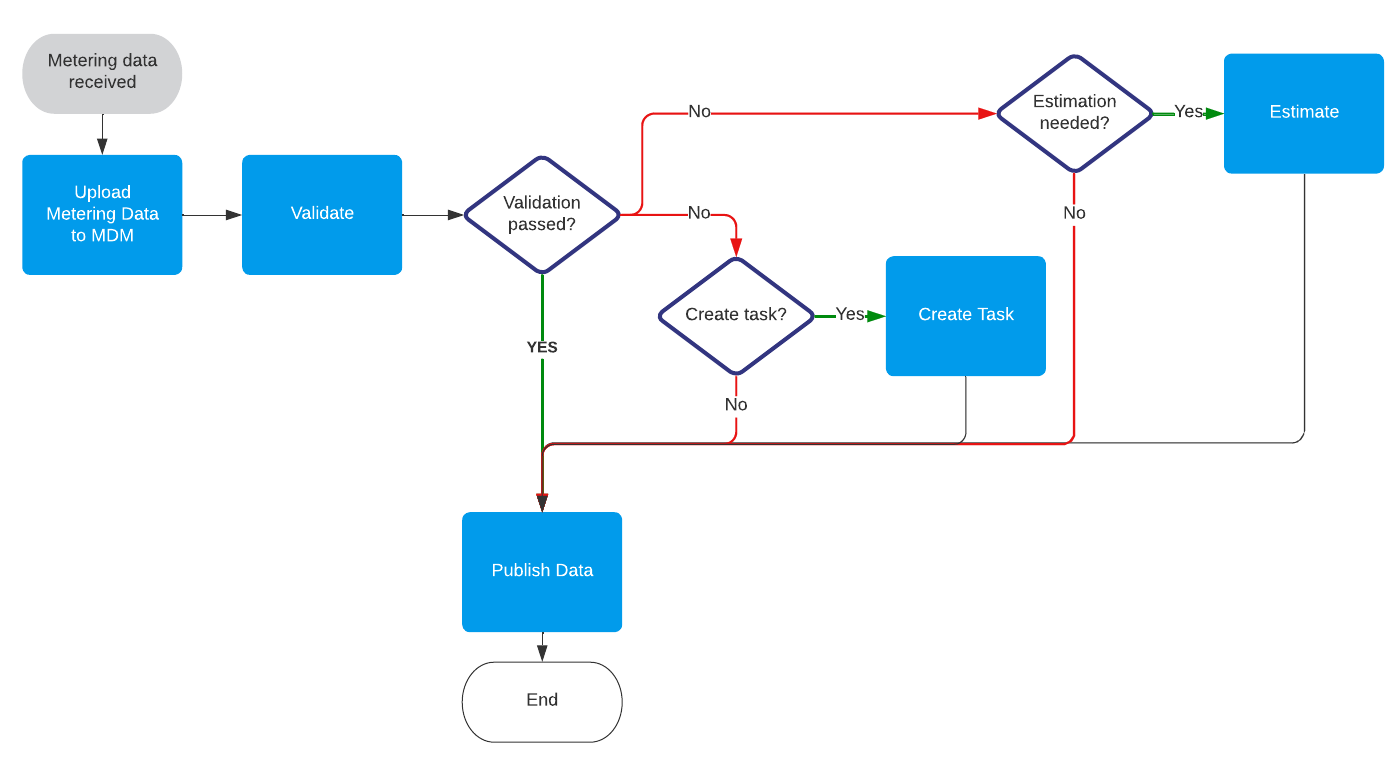
Upload Metering Data to MDM
- Maps fields from incoming messages against the Energyworx data model
- Stores RAW data in the system to the METER datasource
- Default status codes mapping**:
| Status code | DPA name in RAW Channel |
|---|---|
| "1.4.64" | "ClockSetForward_1_4_64" |
| "1.4.128" | "ClockSetBackward_1_4_128", |
| "1.4.256" | "ClockInvalid_1_4_256", |
| "1.2.32" | "PowerFail_1_2_32", |
| "1.4.0" | "AlarmFlag_1_4_0", |
| "1.5.258" | "InvalidMeasuredValue_1_5_258" |
Validate
- Applies configured validation rules to identify data issues
- Adds annotations to datapoints that fail validation. Annotations are stored to the RAW channel on METER datasource.
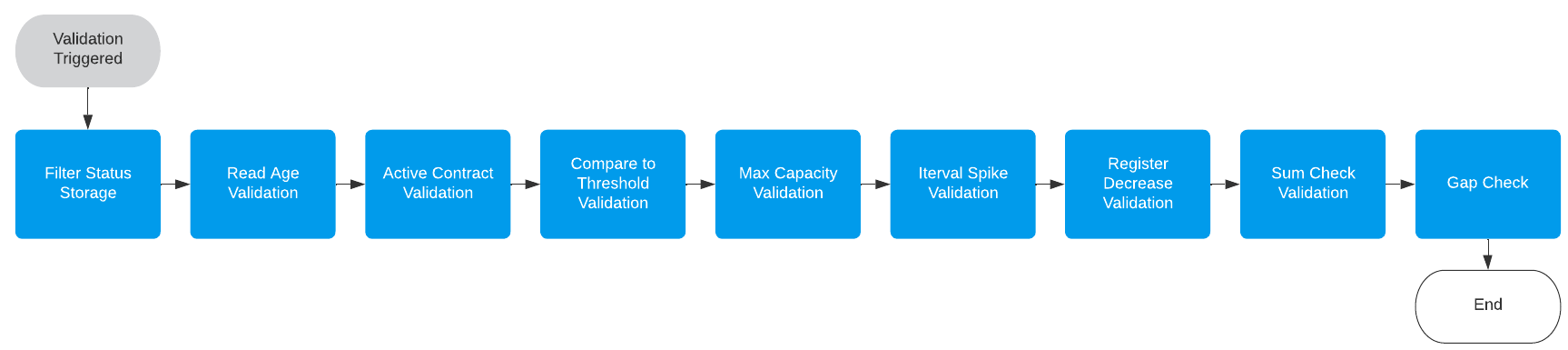
- Validation rules applied:
Create task
- For critical validation errors, tasks are created for human intervention
- Which validation errors are considered critical is configurable
Estimate
- Determines if estimation is needed based on validation results
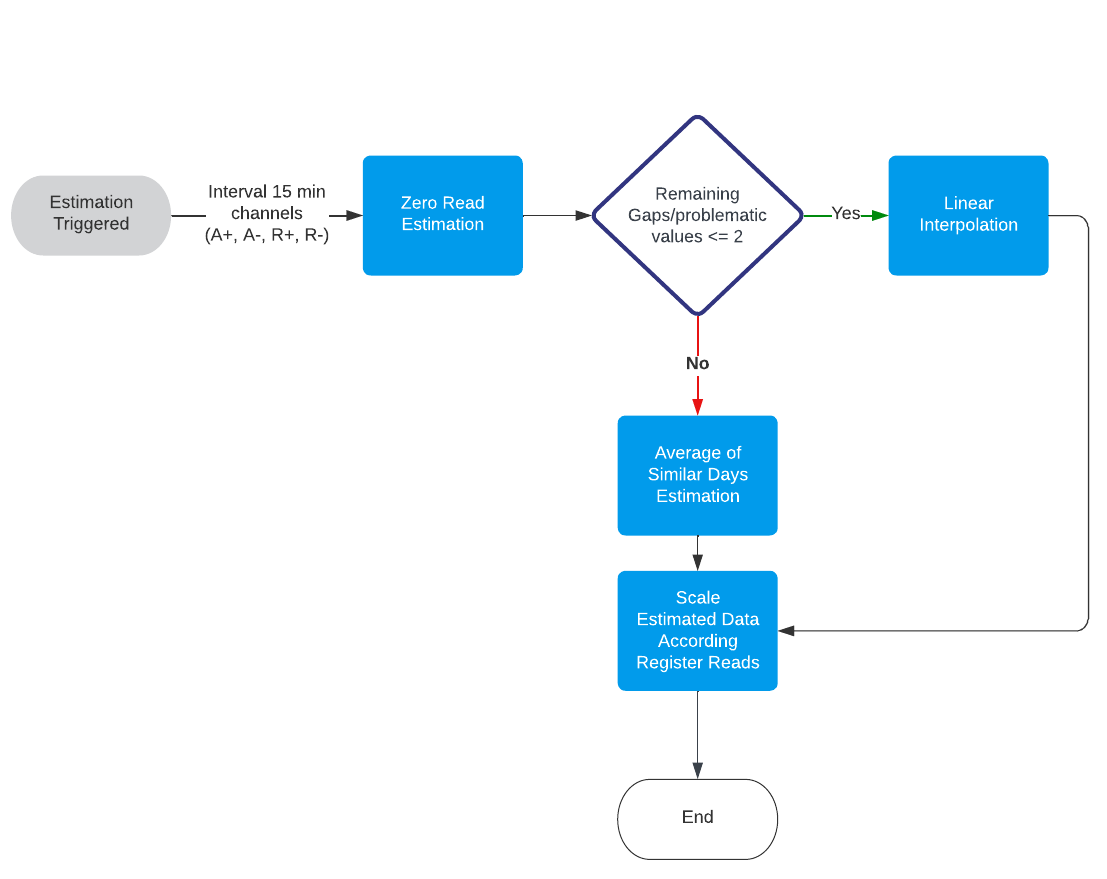
- Applies appropriate estimation rules to generate missing or replacement data
- Stores estimated and validated (VEE passed) data is to the VEE channel on METERING_POINT datasource
Publish data
- Optionally publishes validated and estimated data to third-party applications
- Publication rules are configurable based on business requirements
Business Rules & Customization Points
Validation Rules
Filter Status Storage
- Rule: Standard_Filter_Status_Storage
- Purpose: Stores quality status based on incoming quality codes from measuring data. In case multiple quality codes for the same datapoint, the worse quality prevails. The quality definition:
missing = 1; disturbed = 2; estimated = 3; measured = 4
| Status code | DPA name in RAW Channel | DPA name in VEE channel |
|---|---|---|
| "1.4.64" | "ClockSetForward_1_4_64" | disturbed |
| "1.4.128" | "ClockSetBackward_1_4_128" | disturbed |
| "1.4.256" | "ClockInvalid_1_4_256" | disturbed |
| "1.4.0" | "AlarmFlag_1_4_0" | disturbed |
| "1.5.258" | "InvalidMeasuredValue_1_5_258" | disturbed |
| "1.2.32" | "PowerFail_1_2_32" | measured |
*In case quality status is missing for the incoming data the "measured" status is applied
Read Age Validation
- Rule: Standard_Read_Age_Validation
- Purpose: Identifies data that is older than specified thresholds
- Customization: Configure age thresholds in days
Active Contract Validation
- Rule: Standard_Active_Contract_Validation
- Purpose: Annotates values exceeding threshold during periods without active contract
- Customization: Adjust threshold levels
Compare to Threshold Validation
- Rule: Standard_Compare_To_Treshold_Validation
- Purpose: Validates values against predefined thresholds (e.g., negative values)
- Customization: Define threshold values and comparison operators
Max Capacity Validation
- Rule: Standard_Max_Capacity_Validation
- Purpose: Checks if consumption exceeds contractual capacity defined in the tag
- Customization: Set tolerance percentages
Interval Spike Validation
- Rule: Standard_Interval_Spike_Validation
- Purpose: Identifies abnormal spikes in consumption
- Customization: Configure percentage thresholds and ranking parameters
Register Decrease Validation
- Rule : Standard_Register_Decrease_Validation
- Purpose: Checks if a register read is not decreasing against previous register read
- Customization: Configure tolerance levels
Sum Check Validation
- Rule : Standard_Sum_Check_Validation
- Purpose: Compares sum of interval reads against difference of register reads
- Customization: Adjust tolerance percentages
Gap Check Validation
- Rule : Standard_Gap_Check_Validation
- Purpose : Identifies missing values in the dataset
Estimation Rules
Zero Read Estimation
- Rule: Standard_Zero_Read_Estimation
- Purpose: Estimates "0" values for switched-off periods
- Customization: Configure detection of switched-off periods
Linear Interpolation
- Rule: Standard_Linear_Interpolation_Estimation
- Purpose: Estimates missing values between two data points using linear interpolation
- Customization: Set maximum gap size for which linear interpolation is applicable
Average of Similar Days
- Rule: Standard_Average_Of_Similar_Days_Estimation
- Purpose: Estimates missing data by analyzing daily, monthly, and yearly averages
- Customization: Configure similarity criteria and lookback periods
See detailed description of the rule: [standard_average_of_similar_days](context/ewx-docs/docs/Energy Data Management/VEE rules/standard_average_of_similar_days.md)
Editing Rules
- Scale Estimated Interval
- Rule: Standard_Scale_Estimated_Interval_Estimation
- Purpose: Scales estimated interval data to match difference of register reads
- Customization: Configure scaling factors and conditions
Implementation Considerations
Rule Sequencing
- Validation rules should be applied in a specific order for optimal results
- Consider dependency between rules when customizing
Data Quality KPIs
- Monitor validation error rates to identify systemic issues
- Track estimation accuracy over time
Monitoring & Troubleshooting
Several dashboard widgets are available for monitoring:
- Datasources with Triggered VEE
- % Datasources which completed VEE
- List VEE Flow Errors
- Most Common Errors
- Total Non-Communicating Meters
- Non-Communication Meters
- Data Collection Rate
- Total non-validated Metering Points
- Non-Validated Metering Points
- Total Metering Points with Unexpected production
- Metering Points with Unexpected production
A dedicated taskboard is available:
- Critical_Validation_Errors
Configuration Components
Flow Designs
- Standard_VEE_Flow
Transformation Configurations
- MeterReadings_with_DPAs_Tc
Market Adapter Configurations
- MeterReadings_with_DPAs_Ma