Implementation Overview
Market Context
The SOAP Message Service Integration made its debut in the Dutch energy market through integration with the TenneT Market Message Communication Hub (MMC-Hub). This implementation serves as a reference architecture for future market integrations, demonstrating the platform's capability to handle complex market communications while maintaining scalability and reliability.
Implementation Overview
Our implementation delivers both asynchronous and synchronous message processing capabilities to meet various market communication requirements. The solution showcases the platform's adaptability to specific market protocols, particularly in handling GLDPM and measurement series, whilst providing automated message validation, acknowledgement processing, and comprehensive error management.
The current implementation consists of four parts for Asynchronous SOAP processing (MMC-Hub) and one part for the synchronous SOAP processing (edsn).
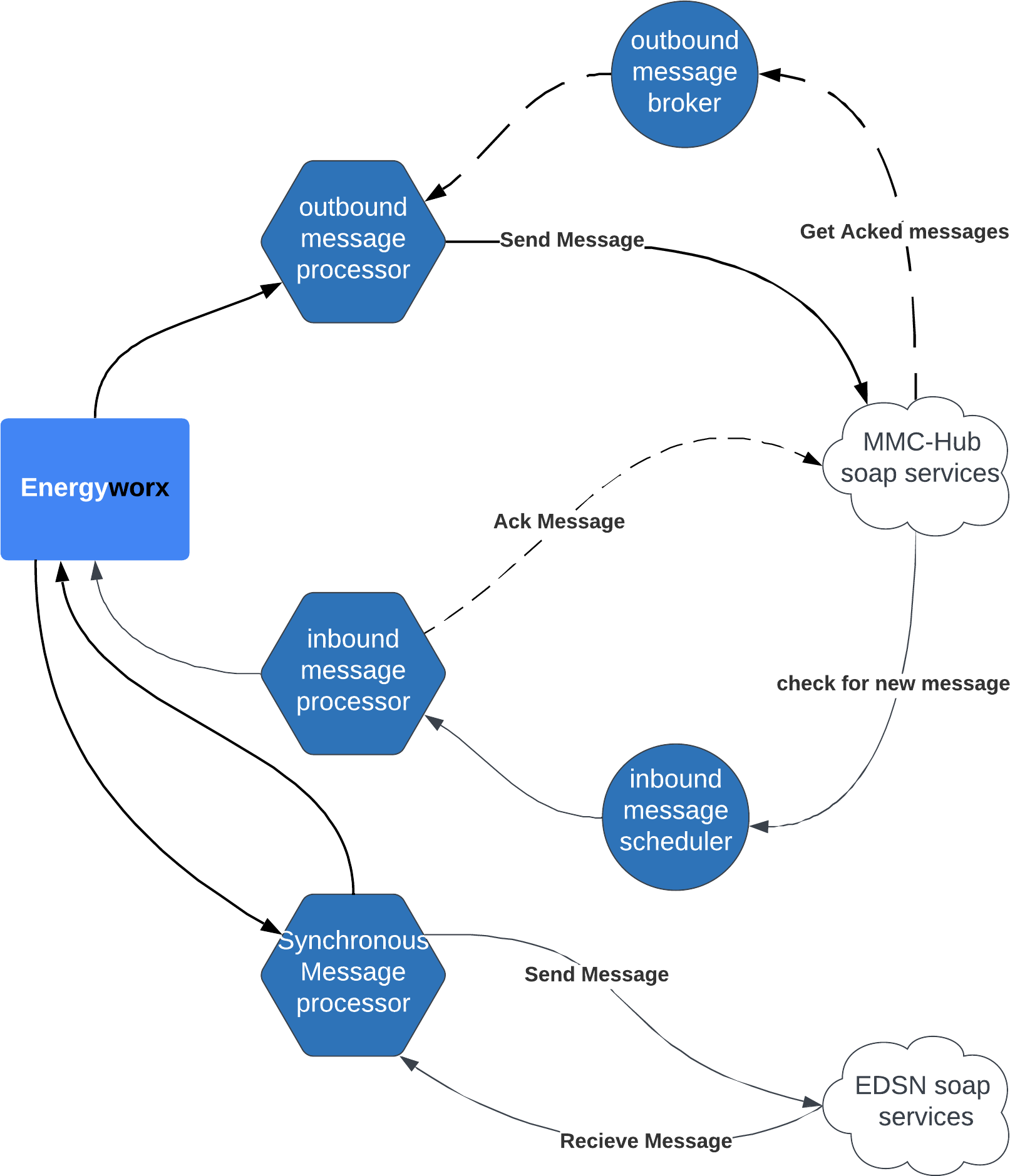
The inbound message scheduler checks for new messages in mmc hub. If there are, it will pull the message from the SOAP-Hub and send it to the Inbound message processor. The Inbound message processor will validate the message and send it to Energyworx. If it is done with checking, it will send an acknowledgement with the status of the validation. This can be ok, or a specific error code.
The outbound message processor will receive an outbound message from Energyworx. It will validate the message structure with an xsd, create a soap message, sign the content, and send it to the mmc hub. If the message is accepted, the outbound message broker will check the SOAP-Hub for acknowledgement. Once the acknowledgement is there, it will check if the marked party accepted the message and if not, create a task in task management so someone can check what went wrong.
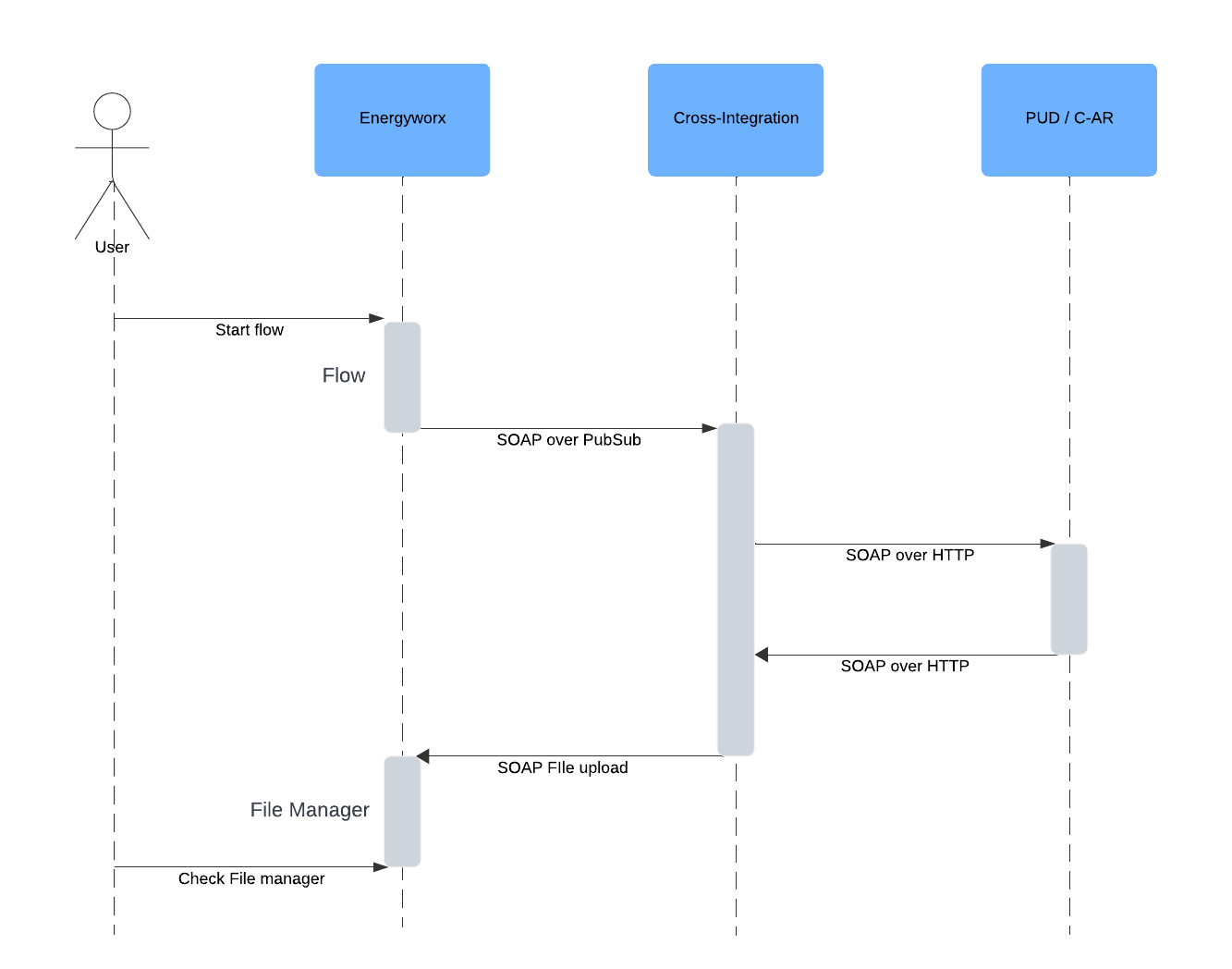
The synchronous Message processor sends a message to the edsn hub and receives a response straight away (same http session). The response is processed and sent to the filemanager.
In a closer look, we also see what infrastructure services and interfaces the process implements.
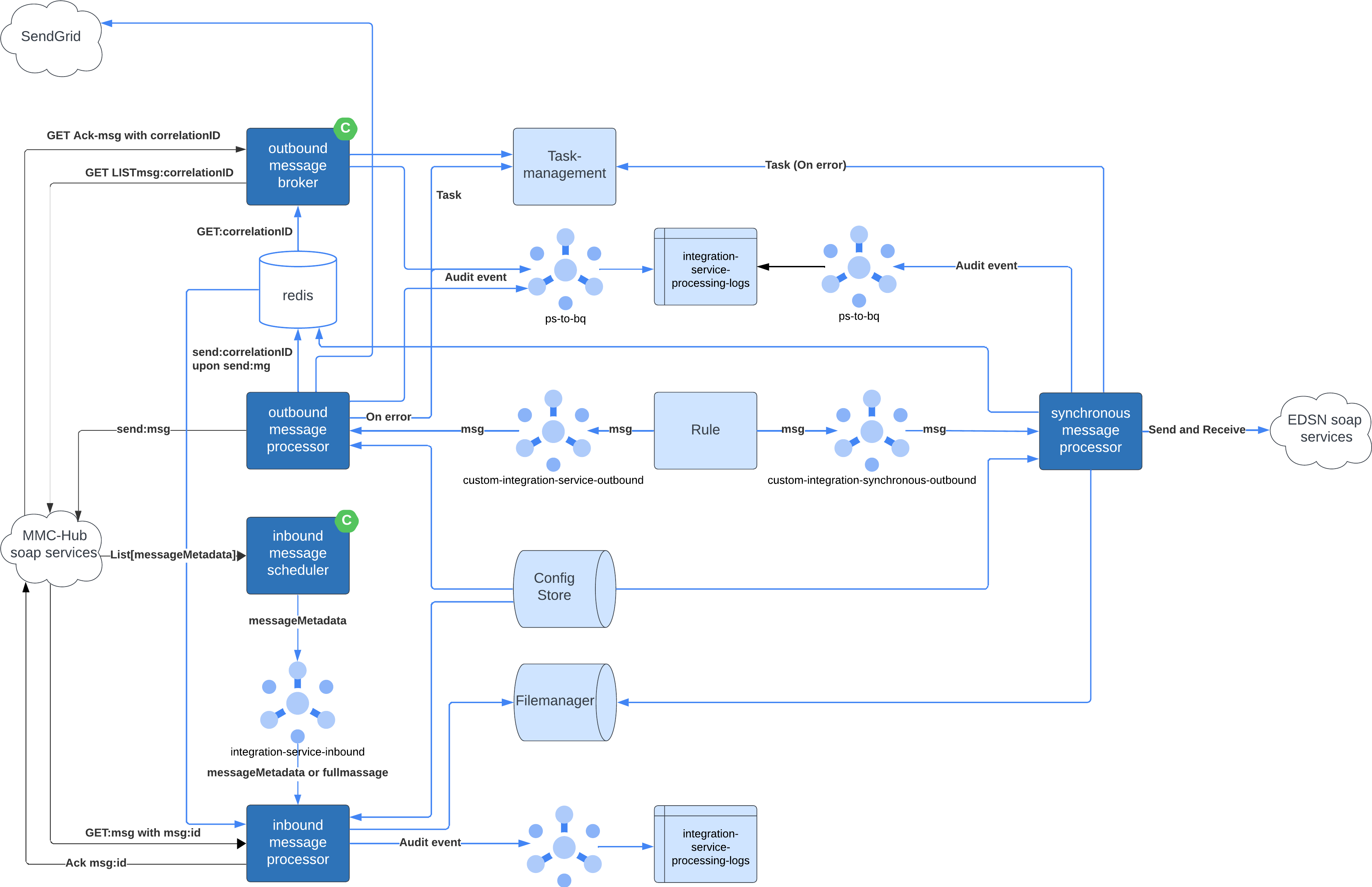
Asynchronous Message Processor
Inbound Message Scheduler
Type : Cronjob
Interfaces
| type | protocol | name | description |
|---|---|---|---|
| soap | https | TenneT MMC-Hub | Dutch TSO energy market hub |
| Pub/Sub | http(s) | integration-service-inbound | topic |
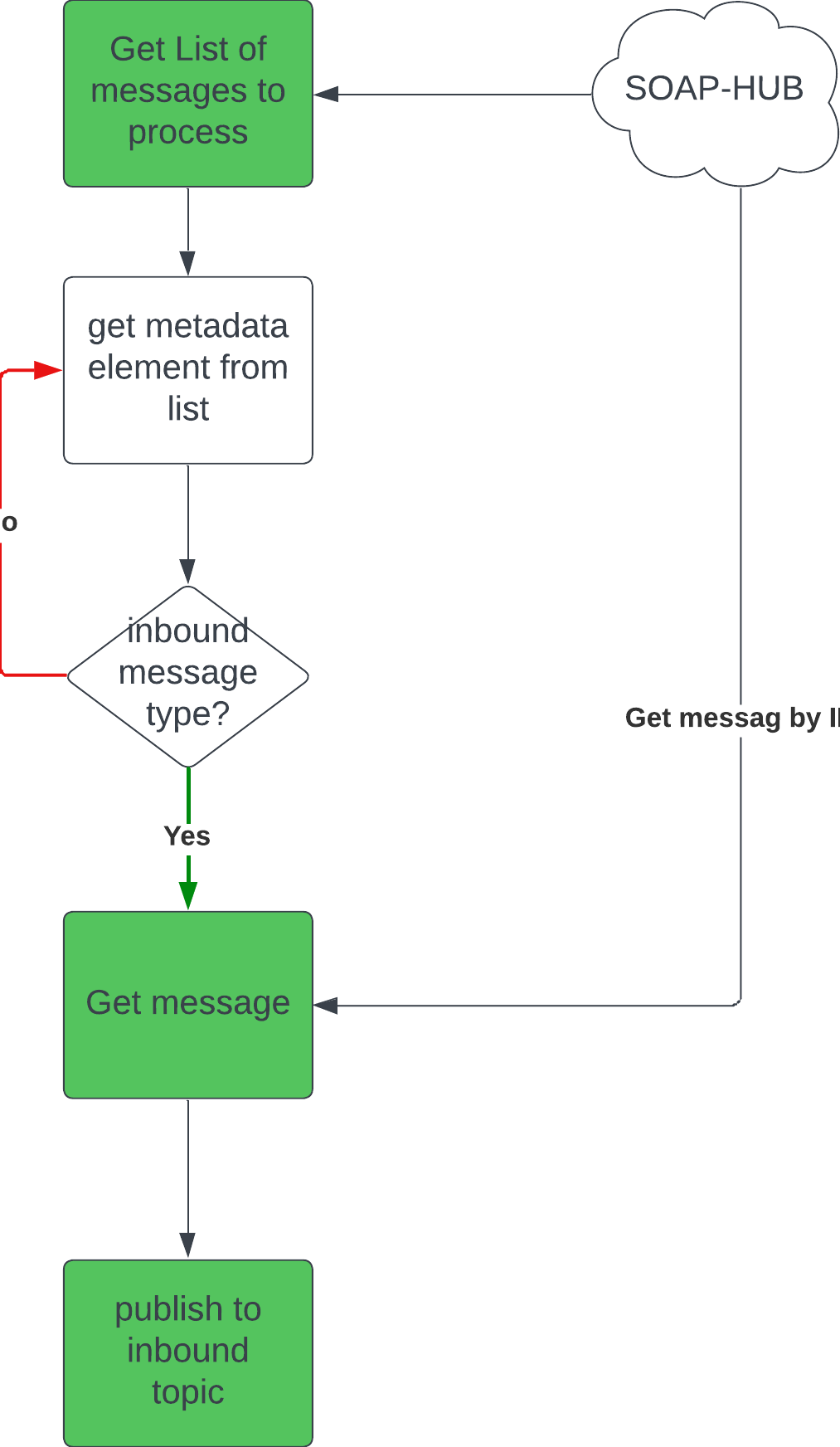
This service performs a List operation on the SOAP-Hub messages that are ready to be picked up. If it returns something, it will pull the message from the SOAP-Hub and send it to the queue for the Inbound Message Processor
Most important implementations is the SoapService
Inbound message processor
Type : Deployment
Interfaces
| type | protocol | name | description |
|---|---|---|---|
| soap | https | TenneT MMC-Hub | Dutch TSO energy market hub |
| Pub/Sub | http(s) | integration-service-inbound | subscription |
| Pub/Sub | http(s) | ps-to-bq | topic for audit events to BigQuery |
| REST | http(s) | <project>-integration-service | storage bucket with configuration |
| REST | http(s) | filemanager | storage bucket |
| REST | http(s) | Redis | state for validation of sequences. |
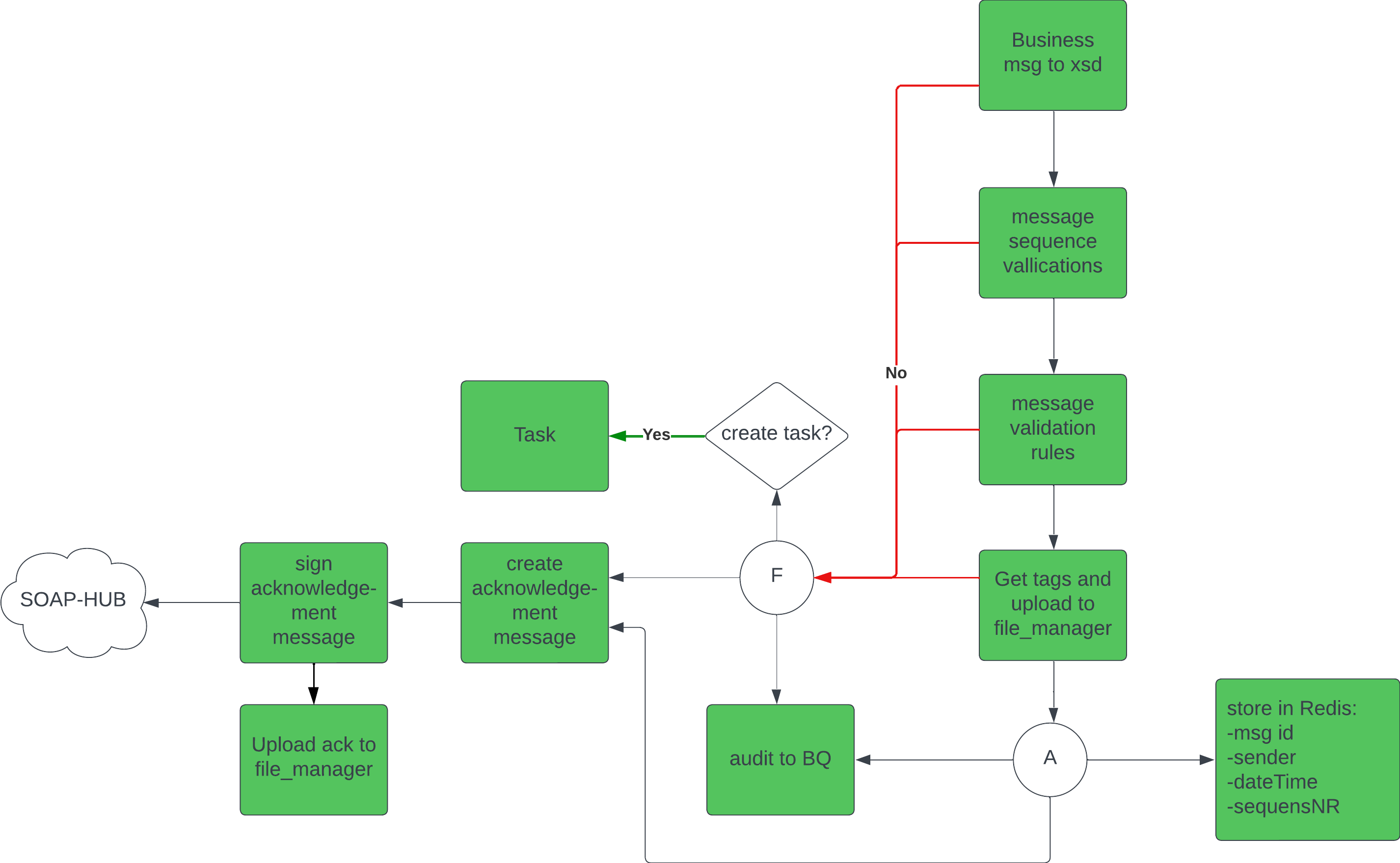
This service receives messages from the scheduler and processes them. The flow for message processing includes sequence validation , XSD schema validation, and custom message validations.
It handles errors and exceptions, logs audit events, and forwards processed messages to inbound cloud storage location (the filemanager).
When the message is processed, it generates an acknowledgement and sends it back to the SOAP-Hub (and also to the file-manager). If there are errors that require a human check, a task will be created in the taskmanager
Outbound message processor
Type : Deployment
Interfaces
| type | protocol | name | description |
|---|---|---|---|
| soap | https | TenneT MMC-Hub | Dutch TSO energy market hub |
| Pub/Sub | http(s) | custom-integration-service-outbound | subscription |
| Pub/Sub | http(s) | ps-to-bq | topic for audit events to BigQuery |
| Pub/Sub | http(s) | custom-ps-to-email | topic for sending email |
| REST | http(s) | <project>-integration-service | storage bucket with configuration |
| REST | http(s) | Energyworx/api/taskmanagement | ewx rest api for creating tasks |
| REST | http(s) | Redis | storing correlation id’s etc |
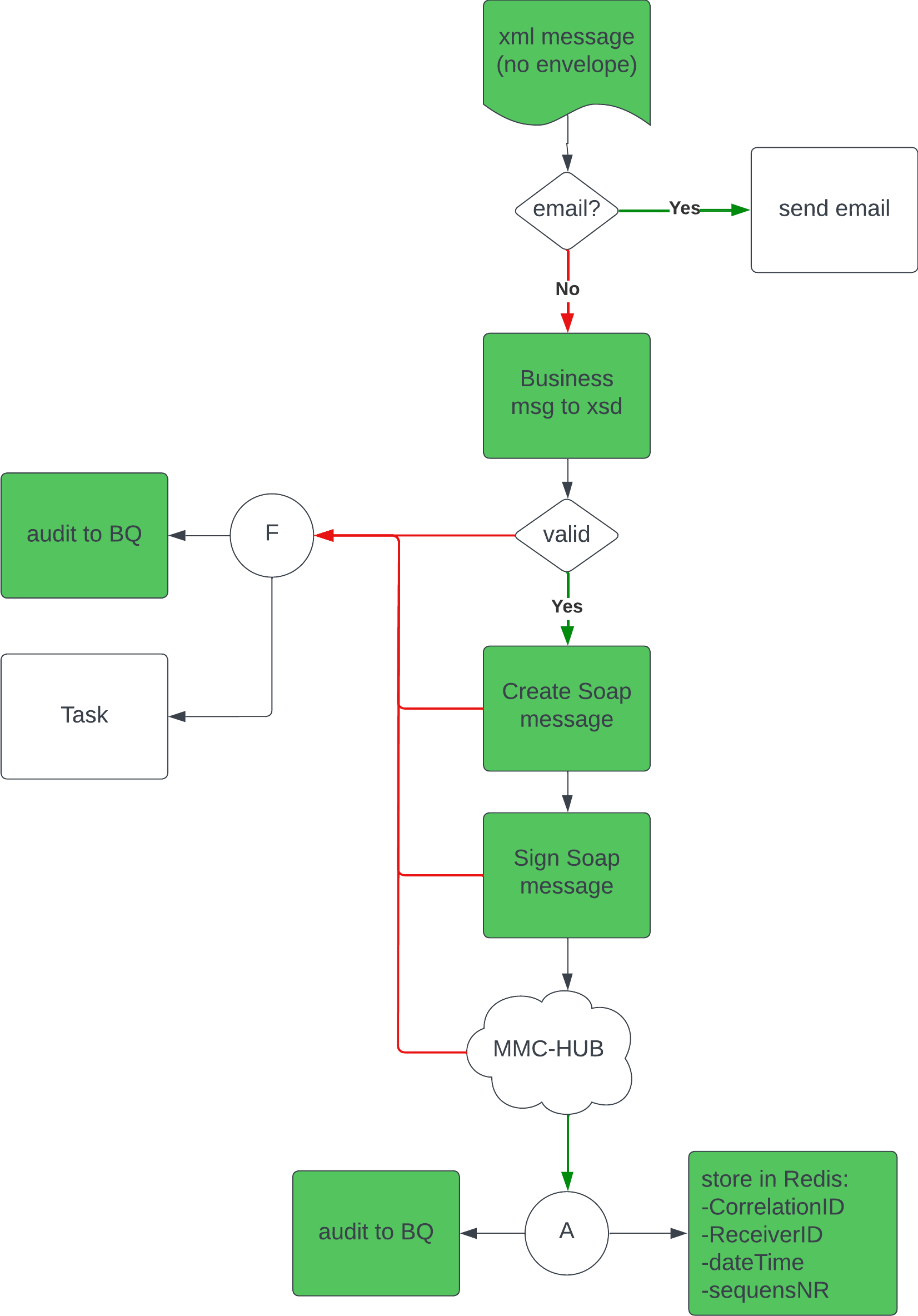
This service handles the outbound messages. It first checks what type of message has been sent out by the Energyworx application. If it’s an email, it will check for valid receivers, and (b)cc address, and send out the email. Otherwise, it will first perform the XSD schema validation. If the structure of the message is good, it will create and sign a soap message and send it to the SOAP-Hub. The correlationId of the message is stored so that the Outbound Message Broker can check for acknowledgements. The process outcome is logged as an audit event, and If there are errors that require a human check, a task will be created in the taskmanager.
Outbound message broker
Type : Cronjob
Interfaces
| type | protocol | name | description |
|---|---|---|---|
| soap | https | Tennet MMC-Hub | Dutch TSO energy market hub |
| Pub/Sub | http(s) | ps-to-bq | topic for audit events to BigQuery |
| REST | http(s) | Energyworx/api/taskmanagement | ewx rest api for creating tasks |
| REST | http(s) | Redis | retrieving correlation id’s etc. |
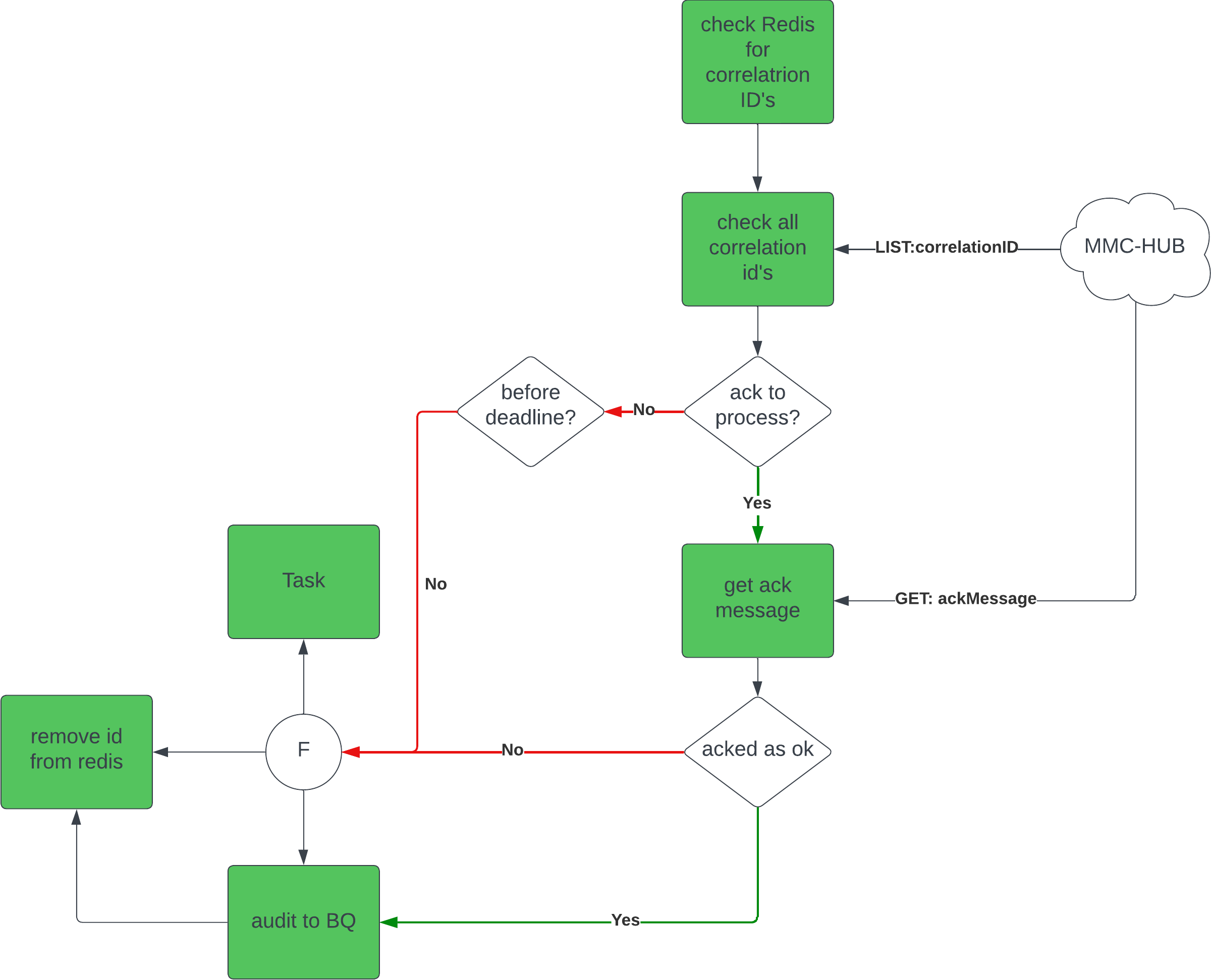
This service pulls a set of correlationIds from Redis and checks for every id if there is an acknowledgement ready in the SOAP-Hub. If there is an acknowledgement, it pulls it from the SOAP-Hub, checks the acknowledgement status and logs this as an audit event. If the status is not ok, it also creates a task in task management. After processing an acknowledgement, it is sent to the file-manager. If the id is not yet acknowledged, it checks if the deadline is passed. If so, it also created an audit event and creates a task in taskmanagement. The last step is to remove the id from the set. If the deadline is not passed, it leaves the id for the next run.
Synchronous Message Processor
The Synchronous Message Integration works similar to the outbound messages towards the SOAP-Hub, a message can be sent from an Energyworx rule (see Energyworx platform below), and the response will be ingested.
Topic: integration-synchronous-outbound
Energyworx platform
To send a message towards the integrated systems, the following rules are available:
- Library rule:
XML Message Builder - Message builder rule:
Construct <message_type> - Publish rule:
Publish Outbound Message- Has to use the correct topic:
- For asynchronous services, such as MMC-Hub:
custom-integration-service-outbound - For synchronous services, such as PUD / C-AR:
integration-synchronous-outbound
- For asynchronous services, such as MMC-Hub:
- Has to have the
message_typein the attributes.
- Has to use the correct topic:
Task Creation
We integrate with the Energyworx API for the systematic creation of tasks.
Gaining Access to Energyworx API
- Create a user tied to a Google Service Account (GSA) to access the Energyworx API.
- Assign the new user to the TaskApiPermissions group to ensure the proper permissions are in place.
- A JWT configuration, complete with a public key, is established for the authentication of API requests.
- Both the private and public keys required for this process are securely stored in Google Secrets.
Task Configuration in Energyworx
- We have predefined task types within the Energyworx application, each associated with a set of statuses, with 'open' being the mandatory minimum status.
- Tasks are allocated to specific taskboards, the identifiers of which are preserved as a dictionary within our environment variables (namespace: taskboardID).
Audit events
To provide comprehensive insights into our system's operations, we employ a logging service that writes data to BigQuery. This allows for the generation of detailed reports and dashboard visuals within the Energyworx application.
Log Data Structure
- Our system publishes logs to a custom topic (
ps-to-bq), which validates incoming messages against a defined schema before they are recorded in theintegration-service-processing-logstable.
The log schema includes fields such as participant_id, message_type, and process_type_id, among others, ensuring a comprehensive capture of event details.
Configuration Management
Primary configurations, like XSDs for message validation, tag-mappings, and validation rules, are maintained within a dedicated Google Bucket.
Configuration Directories
- Maps Directory: This directory stores all the mappings of different file types going in and out of the integration service. The values retrieved are used in other parts of the integration service.
- Schemas Directory: This directory stores all the XSD files. Each XSD is named identically to the message type it validates, ensuring a direct correlation between incoming messages and their respective validation schemas.
- Tags Directory: Here we house the mappings for tags used within the FileManager. The mappings are presented in a JSON format where each tag name is associated with the name/xpath of the XML element it represents. Deprecated because this is added to the mapping.
- Rules Directory: This directory contains JSON files with validation rules. Each file is named in the format messageType_MessageProcessTypeId. The rules define the criteria against which message elements are validated.
- Config Directory: This directory contains JSON file
message_config.json. the file contains al the configuration items per message type where the rules, xsd’s and mappings can be found. See the page message config for more details.