Channel Family Overview
A Channel Family manages data retention policies across your data source. This feature enables the automated enforcement of retention rules, helping organizations optimize storage costs and maintain compliance requirements.
Key Features
- Configurable retention policies based on version count and/or time periods.
- Automated policy enforcement through Google's garbage collection process.
- A standardized way to organize related channels and their associated metadata.
- Enables efficient data storage and retrieval through structured attribute definitions.
Retention Policy Details
- Retention is triggered when either the version limit or the age limit is reached.
- The garbage collection process can take up to 5 days.
- Computed flags will not evaluate if the referenced data is deleted with no newer versions available.
- Channel Family assignments are permanent due to the storage architecture.
Configuration Options
- Maximum Versions: Limit the number of versions stored.
- Maximum Age: Set time-based limits in months.
Either limit can be marked as "not applicable."
How to create a Channel Family
To create a new Channel Family take the following steps:
- Go to [Smart Integration -> Channel Classifiers -> Manage Channel Families -> Add Channel Family]
- Fill in the technical and display name of the Channel Family (description is optional)
- Fill in the Data Retention Policy. For both age in months and the maximum amount of versions “not applicable” is a valid option and will automatically ignore the combination rule.
- If a rule already exists creation will be cancelled and the name of the existing Channel Family will be provided for selection.

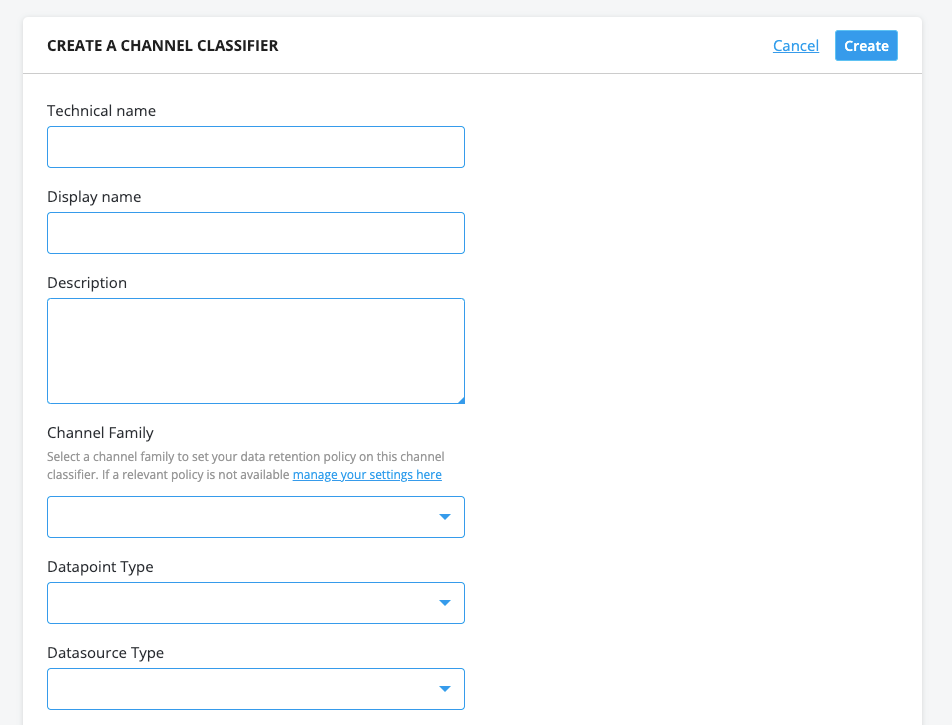
To assign a Channel Family to a new Channel Classifier take the following steps:
- Go to [Smart Integration -> Channel Classifiers -> Add Channel Classifier]
- In the Channel Classifier creation process select one of the existing Channel families
Note on Logical Operators
- When using the OR operator, deletion occurs when the version limit OR the age limit is reached. For instance, with settings of "5 versions OR 3 months," data exceeding either limit will be marked for deletion.
- When using the AND operator, deletion occurs when both the version limit AND the age limit are reached. For instance, with settings of "5 versions AND 3 months," data exceeding both limits will be marked for deletion.
Important Note
It is not possible to change the channel family of a channel classifier once it has been assigned. If this is necessary, please contact the Service Desk.