Channel Classifier
Channel Classifier Overview
A Channel Classifier serves as an organizational container that helps structure and manage data within the Energyworx platform. It acts as a logical grouping mechanism for channels: each channel must belong to exactly one classifier, while a single classifier can contain multiple channels, typically one channel per data source.
A channel classifier has two key names:
- A technical name is used for internal reference by the platform and data processing components (e.g., flow rules).
- A display name is the user-friendly, readable name that appears in the console.
Data Components
Channel Classifiers manage three distinct types of data.
- Timeseries Data: These are the primary numerical values stored with their corresponding timestamps. They are based on a configured unit type, such as
kWhfor power consumption. - Annotations: This is flexible, unstructured metadata that can be attached to individual data points as objects. It is best suited for dynamic information that can vary between readings, such as
gapsorunverified readings. - Datapoint Attributes (DPAs): These are structured metadata fields with predefined types (e.g., float, timestamp, or enum/symbols) that are configured at the classifier level. They are ideal for consistent, repeating metadata that appears across many readings, as they are stored more efficiently than annotations.
Key Features
- Each Channel Classifier is permanently associated with a Channel Family.
- A Channel Family determines the data retention policy for all channels within that classifier.
- A Channel Family also provides a standardized way to organize related channels and their metadata.
- The structured attribute definitions within a Channel Family enable efficient data storage and retrieval.
For more detailed information, please refer to the Channel Families guide.
Technical vs. Display Name
The display name is what business end-users see in charts and dashboard widgets.
In contrast, the technical name is used by the platform for internal references. It cannot be changed once set, as doing so would break dependencies on existing data saved in the platform. The display name, however, can always be edited if a change is needed.
How to create a Channel classifier
To add a new Channel Classifier:
- Go to [Smart Integration -> Channel Classifiers] and click the Create button on top of the screen.
- Fill in the name of the classifier, the description field is optional.
- If applicable, choose a Channel Family
- Select a Datapoint Type (interval, gauge or register).
[Note: Interval reflects a unit measured over time (for instance kWh). Gauge reflects a measurement at a specific moment in time (e.g. temperature). Register reflects a cumulative value (always increasing).] - Select a Datasource Type (power, gas, water, temperature, time or air).
- Select a Unit type based on the Datasource Type (ie: kWh for power)
- Click [Save] when you’re done.
How to create a Channel Classifier with DPA
It is possible to configure channel classifiers with DPAs fron the front end. This is a beta feature, and therefore it is only available from the new console, for users who have Beta features enabled. To enable Beta features, go to User Settings > Beta Features > Enable, then refresh the page.
To create a channel classifier with a DPA, follow steps 1-6 above and then: 7. Click [Add Attribute Group] 8. Fill in the name of the DPA and choose its type 9. If type enum (Predefined value): write out the pre-defined values one at a time, clicking [Add predefined value] each time 10. Click [Save] when you’re done.
How to edit a Channel Classifier
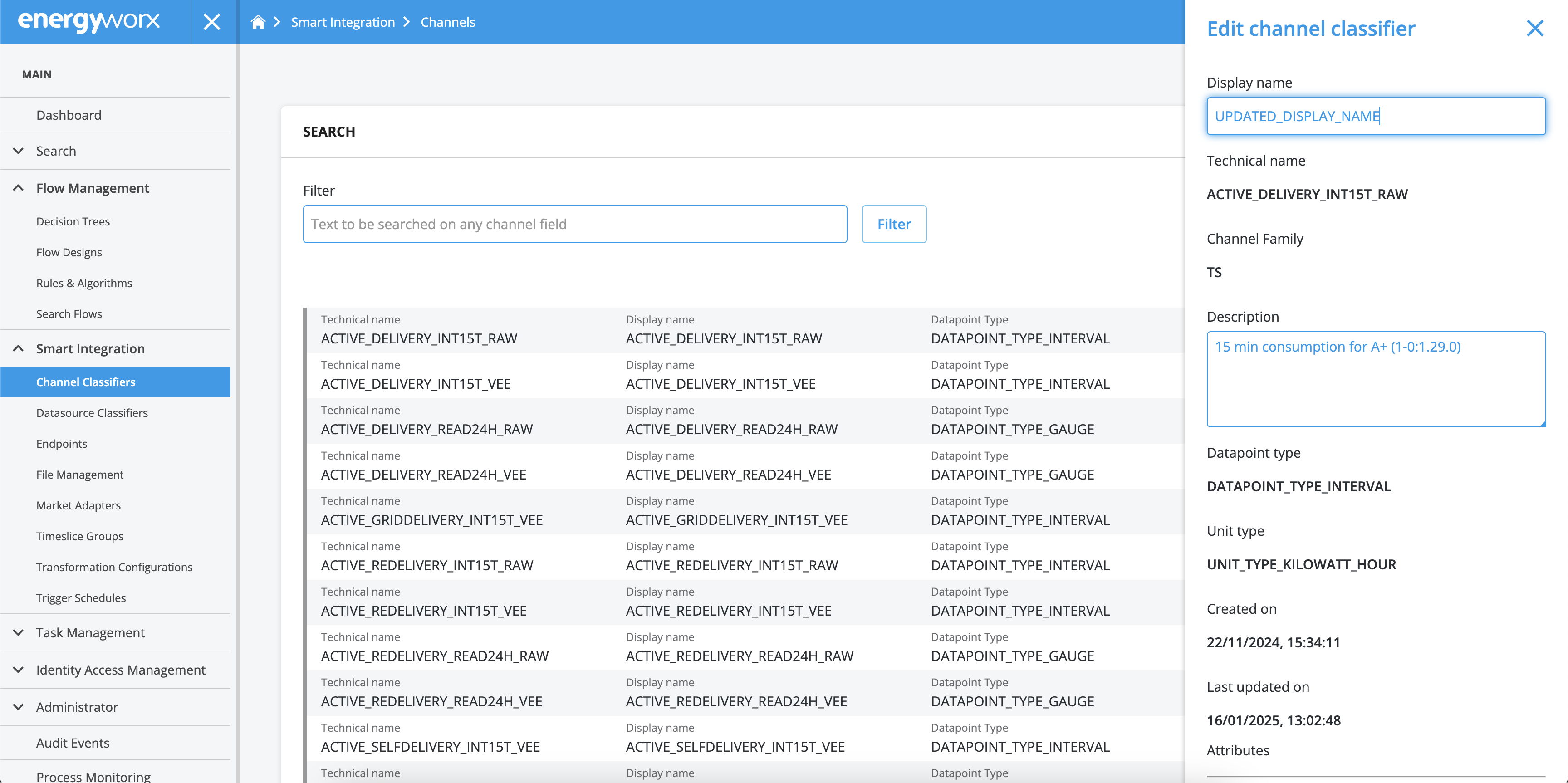
In case you need to edit the name or the description of an already existing Channel Classifier, just take the following steps:
- Go to [Smart Integration -> Channel Classifiers] and search for the Channel Classifier you need to edit.
- Click the [Details] button on the left.
- Click the [Edit] button at the bottom of the pane.
- The Name and Description fields are now available to edit.
- Scroll down on the pane and click [Save] when you’re done.
Important Note on Datapoint Attributes
A channel classifier can only support Datapoint Attributes (DPAs) if it is created with at least one DPA. You can add additional DPAs later, but it is not possible to add DPAs to a channel classifier that was originally created without any.
It is also not possible to remove DPAs once added. For DPAs of type enum (Predefined value) you can extend the list of allowed values, but not remove any items from it.
Important Note on Channel Families
Channel Family assignments are permanent. Once a Channel Family is assigned to a classifier, it cannot be changed through the platform's UI or API. Modifications to this setting can only be made through the Service Desk.